If you’re not sure what a Google Hangout is, well… You’ve been under a rock for a while. Simply put, this is a very easy and web-based way to talk to someone face-to-face, from any nearly web-based device that has a web browser. You can do this one-on-one like with Skype, or you can use this for more of a public webinar kind of use case. It’s part of the whole Google+ suite of features. Even if you’re not actively using Google+, this feature is pretty sweet. It’s amazing what they’re able to enable you to do with a web browser! If you’re doing the latter, you might want to read on…
It’s been a long while since I’ve released a NEW module into the DotNetNuke community – maybe at least a year ago since my last release. It’s been even longer since I’ve blogged here, and I am sorry for that. But as I said on twitter the other night, I’m back! I’ve had some modules go out into the wild that you might not have heard of, including a couple for user groups as proof of concepts, and even an update to the Media Module in February. (Do a search for “user group labs” for the others on codeplex.)
Google Hangout for DNN
If you’re reading this and not using DNN, sorry. But this is an open source module, so if you’re a developer, you can take a look at the source for this module (and many of my others) on github. You’ll be able to see this module in action next week though for a live DNN webinar with
Peter Donker (T|B|L), Joe Brinkman (T|B|L), and myself. You can follow our twitter feeds to get those details as soon as they’re available.
“Hey Will. Why should I build a module for this? Google Hangouts has an embed code. I can just copy and paste it.”
If you are asking yourself that, you’re absolutely right, and there’s nothing to prevent you from doing that. However, having a module to manage this gives you the benefit of structured content, ability to delegate management of Hangouts to non-technical people, and there are more features and purposes planned for this module that will be announced later.
DNN Hangout Features
This is a first release, so there is going to of course be a minimal number of features, and they include:
Quickly add a Google Hangout via copy/paste
Template available to change how the module is displayed to users
Show start date/time and duration for future/past Hangouts
For those of you that are developers, here is a feature list for you!
Uses content items for the DAL
Uses DNN token replace
Uses PortalSecurity for user input filtering
This version 01.00.00 release has the following minimum requirements.
DNN version 07.03.04
SQL Server newer
Microsoft.Net version 4.0 or newer
How do I use DNN hangout?
Today, the features are simple… You create a hangout in Google Hangout. It can be a regular hangout, but what this module is really meant for is On Air Hangouts. These are the kind of hangouts where you would be broadcasting an even to the public.
Next, you copy the hangout URL, video ID, or embed code. This module will accept them all and magically grab the information it needs from you. Go into the module’s edit view to manage those settings.
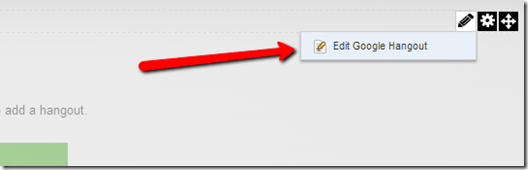
Once you see the edit view, add the relevant information, including the Google Hangout information you copied earlier.
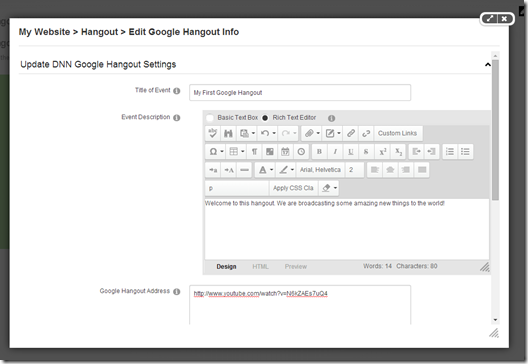
You even have some sample Google Hangout addresses to test and compare with to make sure you’re adding the right information. As long as you add the right address, it will be parsed and the video ID will be the only thing that remains once you save.
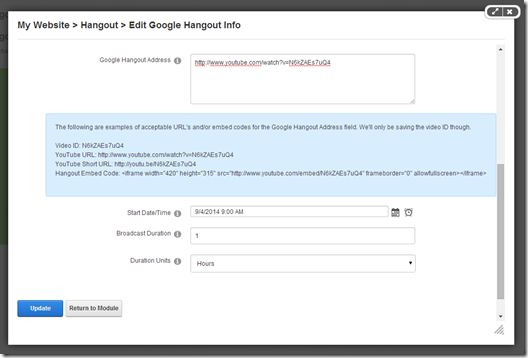
Now that you have the right information in place, you can save your new hangout and you’ll see it immediately on the page.
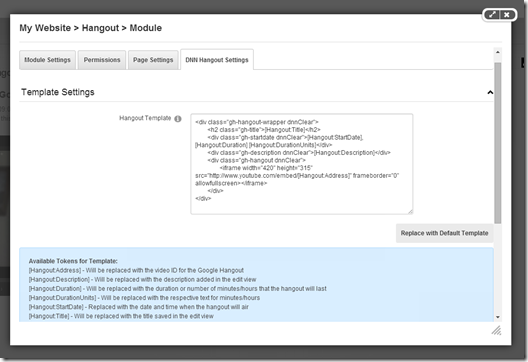
This is probably not how you want your hangout to be displayed on you site. Don’t worry… You’re covered with the module settings. Just update the default template with your own HTML and use the placeholder tokens to add the hangout information in the places of the HTML that you want. Once you save it, your changes will be reflected on the page. You should know that this module also supports DNN tokens, so feel free to add things like user personalization if you want.
Best DotNetNuke Hosting
Following reviewed for Best ASP.NET hosting companies that help with DotNetNuke, ASPHostPortal is Best ASP.NET Hosting for DotNetNuke Recommendation. They give 99,99% uptime assured, as well as 30 Days Money back assured, best friendly customer service, and many more.