DotNetNuke is an automated content management framework that is explicitly intended to be used in intranet and extranet deployments with the open source portals. DotNetNuke contains a set of tools that enables you to build dynamic websites.

The word on the internet is that DNN 7.0 is about to drop any day now. I’ve been following this one quite closely since the DNN World conference (a month ago now, how time flies!) and I’ve been doing extensive compatibility testing with my software.
And This top reason why you will love DotnetNuke 7 :
1. New Installation and Upgrade
There was a time when everyone seemed to agree that installing DotNetNuke was a tough task fit only for the bravest of souls. I didn’t ever really think that way, because the whole idea of a self-installing and self-upgrading web application was the stuff of fantasy not that long ago. I mean, I can remember the day when you had to register COM components and restart IIS to get stuff to run. I hope you, the reader, have no idea what I just said because that means the industry has made vast gains. DotNetNuke itself was always an easy thing to get going, but now it is dead simple and informative.
How so? Well, the installer is a one-page set of questions, many of which are pre-answered. And then, you click ‘go’, and it whizzes through, installs all the various parts and then gives you a new screen with a couple of options – either explore more about the platform, or just let you dive straight in and get going. And, just like in DNN 6, when you’ve finished the install, you’re already logged in. Nice.
DotNetNuke 7.0 now has an upgrade wizard with the same look and feel as the install wizard. With the added feature of being required to log in as a super user account in order to start the wizard off. Having done multiple upgrades with software testing now, I like everything about the upgrade wizard.
2. Default View Mode
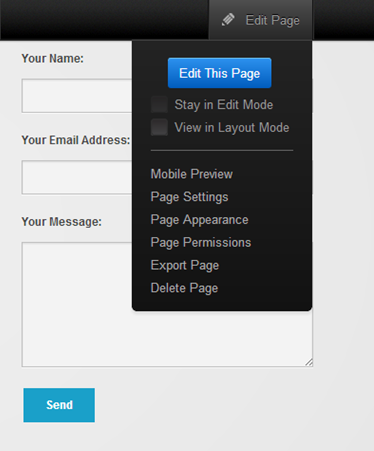
DotNetNuke 7.0 now defaults to ‘View Mode’ – which, despite the fancy name – just means the content, by default, looks as it will to the site visitors. And, because it defaults to ‘View Mode’, the old ‘View Mode’ wording/button/control – it’s gone now. It’s just the normal view, or edit or layout views. Simple.
3. Drag and Drop
.png)
You select the thing you want to add (Text/Html module) then you drag a copy of that to the place on the page you want it. That’s it – couldn’t be simpler or more intuitive. To me it is very elegant in operation because not only are you putting things where you want, but the page expands dynamically to show where the insert will be.
4. Auto Save
With the Text/Html module, your content can be auto-saved as you type. No more lost content. Much fewer curse words being sent in the direction of DotNetNuke installs. A real positive step forwards.
5. Control Panel
The new DNN 7 control panel uses the concept of common, less common and user-configurable areas. Or, in plain-speak, things you use all the time, things you don’t, and a place where you can make your own list.
Benefit Of DotNetNuke 7 for Website Developer
1. Benefit from 1000s of ready-to-use functionalities
DotNetNuke comes with many built-in features that are ready to be used in your website. By using DotNetNuke, you will be able to add rich features to your website, for free, such as discussion forums, blogs, feedback forms and much more. You can also select from thousands of commercial extensions, that will allow you to include advanced functionalities, such as image galleries, image slideshows, opt-in email marketing and e-commerce. And if you can't find what you need, you still have the option to develop customized extensions, knowing that there is a community of over 700,000 users ready to assist.
2. Easier and faster website development
DotNetNuke will make developing websites faster, whether you are using DotNetNuke as an instant website builder or as a web application framework. For more information, see our Developing with DNN section.
3. Make more money developing websites
DotNetNuke will give you a competitive advantage to win website development contracts. By showing your potential clients the many advantages they will have if their website is built with DotNetNuke, you can more easily convince people to choose your services. Shorter delays to develop websites, fully featured websites, ability to manage content easily in-house, proven technology: these arguments will certainly help you sell your proposal.