
November 7, 2016 11:36 by
 Dan
DanAccording to webascender article, If you skin sites regularly for DotNetNuke, you may have run into a problem with background images or colors showing up in the FCK editor on your sites or in the background of the Link Gallery window that pops up on your site. These two issues both have simple solutions that will save you time and frustration.
FCK Editor Background
When coding CSS, the typical place to insert a background image or color is through the BODY selector. This selector will manipulate the background of your site, but will also change the BODY tag inside an iFrame that is incorporated when you edit textboxes through the built-in FCK Editor in DotNetNuke. If you have a dark background and text color, the text in the FCK Editor will be unreadable and will be manipulated by whatever text manipulating properties you have on your BODY tag.
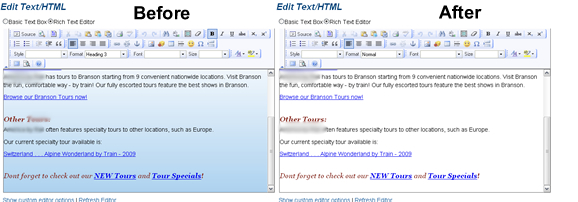
In DotNetNuke, a Body ID tag is automatically added to the BODY tag of your site. Putting all background and related properties in this #Body selector will prevent the FCK Editor’s BODY tag from inheriting any unnecessary style changes. Making this switch will enable you to view text in the FCK Editor as it’s meant to be, instead of inheriting aspects of the BODY tag.
Link Browser Background
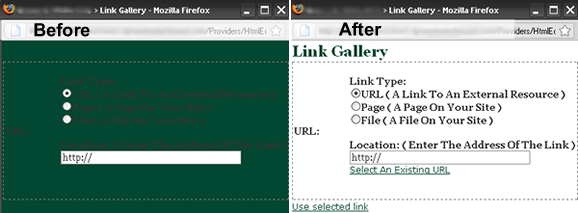
This problem is related to the FCK Editor Background issue we see in DotNetNuke. The Link Gallery box also has an issue with inheriting backgrounds from the BODY tag. The Link Gallery box is the window that pops up when you try to insert a link in the FCK Editor and click “Browse Server.” Dark text is unreadable when your background is dark. This issue can be fixed by adding a suitable background color to the #Table2 selector in your skin.css file.
Best Recommended DotNetNuke Hosting
ASPHostPortal.com is the leading provider of Windows hosting and affordable DotNetNuke Hosting. DotNetNuke Hosting from ASPHostPortal.com provides a safe, reliable and performance-driven foundation for your DotNetNuke website. DotNetNuke is the perfect Content Management System for managing and developing your website with one of ASPHostPortal’s Hosting plans. ASPHostPortal has ability to support the latest Microsoft and ASP.NET technology, such as: WebMatrix, WebDeploy, Visual Studio 2015, .NET 5/ASP.NET 4.5.2, ASP.NET MVC 6.0/5.2, Silverlight 6 and Visual Studio Lightswitch, ASPHostPortal guarantees the highest quality product, top security, and unshakeable reliability, carefully chose high-quality servers, networking, and infrastructure equipment to ensure the utmost reliability.