
September 1, 2016 18:46 by
 Armend
How to Install module extension in DotNetNuke ?
What is actually a module extension in DNN? A module extension can be considered as plugin program that you can install on your site. Just imagine you have a car and you want to add a new sound system to your car, this new sound system can be considered as a plugin module to enhance your car looks and feeling.
To install a module extension in DNN, you will need to use a host account known super user account. Once login on the site, you will have a menu called host. Under this menu, you will find a menu called Extensions. Please click this menu.
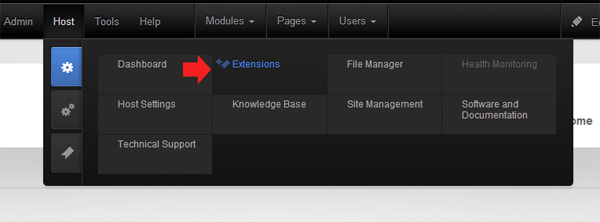
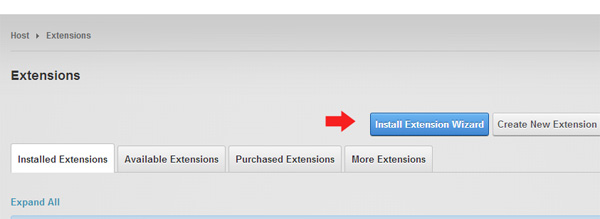
A page contains extension modules list will appear.
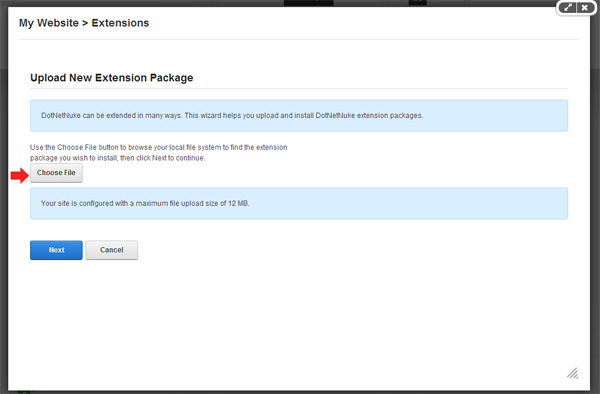
Click the browse button to select the installation file. The installation file in DNN must in .zip format.
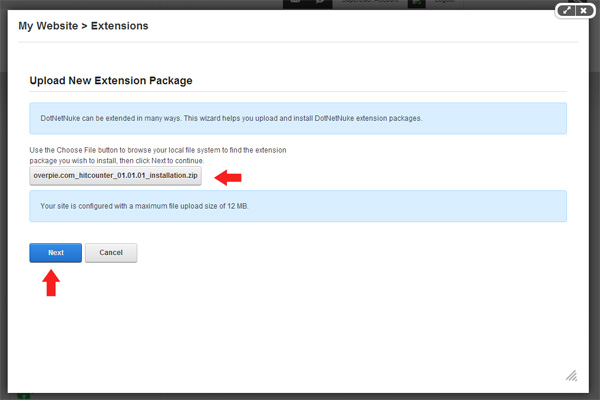
Click the Next button and you will be able to see the details of the extension specification.

If there is a release note, you will be able to see the what updates or changes that have been made.

If there is a license note, you will be able to review it as well. Tick the checkbox and click Next button to accept the license.
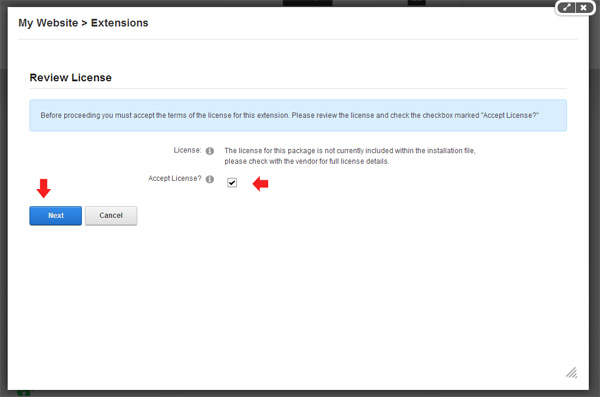
The installation will be fully completed if you do not see any warning or red text in the scrolling installation summary process

Best Recommended DotNetNuke Hosting
ASPHostPortal.com is the leading provider of Windows hosting and affordable DotNetNuke Hosting. DotNetNuke Hosting from ASPHostPortal.com provides a safe, reliable and performance-driven foundation for your DotNetNuke website. DotNetNuke is the perfect Content Management System for managing and developing your website with one of ASPHostPortal’s Hosting plans. ASPHostPortal has ability to support the latest Microsoft and ASP.NET technology, such as: WebMatrix, WebDeploy, Visual Studio 2015, .NET 5/ASP.NET 4.5.2, ASP.NET MVC 6.0/5.2, Silverlight 6 and Visual Studio Lightswitch, ASPHostPortal guarantees the highest quality product, top security, and unshakeable reliability, carefully chose high-quality servers, networking, and infrastructure equipment to ensure the utmost reliability.