Integrating your Zoom search page into DNN
At this point, you should have a working search page which you can access and perform search queries on as seen above. You can use your search page just as it is, and simply modify the "search_template.html" file to match the look of your site. However, if you want to further integrate the search page inside your DNN website (so that it will maintain the same skinning and various modules you are using), then read on.
First, we need to "Add" a new page in DNN to serve as your new Search Page. This will contain a search form, and your search results. You can name this something appropriate like "Site search".
On this new page, we will need to add an IFRAME module (if you do not see "IFRAME module" in the Modules list, you will need to login as "host" and "Find/Install additional modules"). You can title this added module as "Search" or something similar. Now click on the "Edit IFrame Options" button.
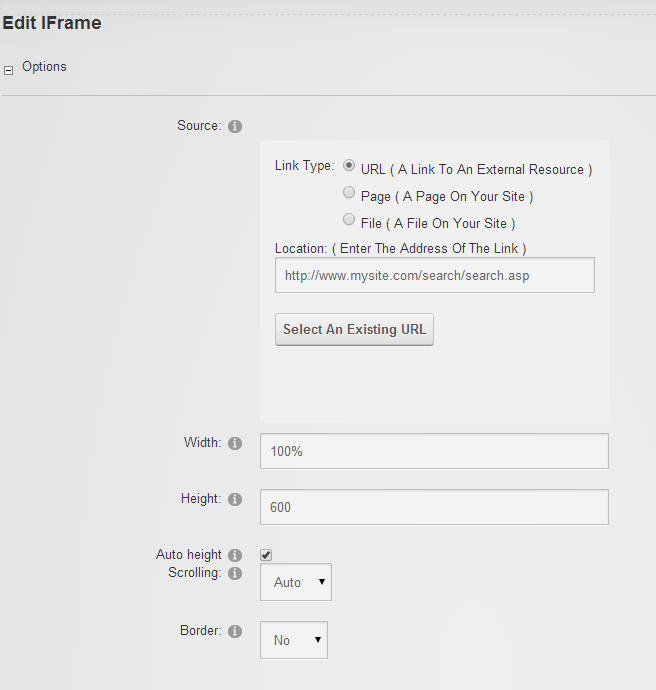
Here you should specify the Link Type as a URL, and copy and paste the URL of your working search page (from before) in the "Location:" text box as seen below. For the width, specify "100%" and we recommend a decent height of something around 600 pixels (or enable Auto height if your search page is on the same domain as your DNN site).
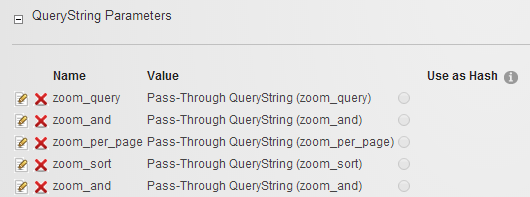
Next, click on the expand box next to the "QueryString Parameters" heading. We will need to add all the parameters that Zoom will use so that the page can pass these parameters along to the actual "search.asp" script within the IFrame. Click on the "Add QueryString Parameter" link and specify the following:

This allows the main search query to be passed to this page. If you would like to have more parameters in your custom search forms (search forms that you will place on other pages of your site), then you will need to add them here as well. If you are not familiar with the idea of the custom search form or what other parameters are necessary, don't worry, as this will be explained a little later below and you can come back here to add more parameters as needed.
Now click "Save" to return to your search page. You should now see your Zoom search page loaded within the IFrame of your DNN search page!
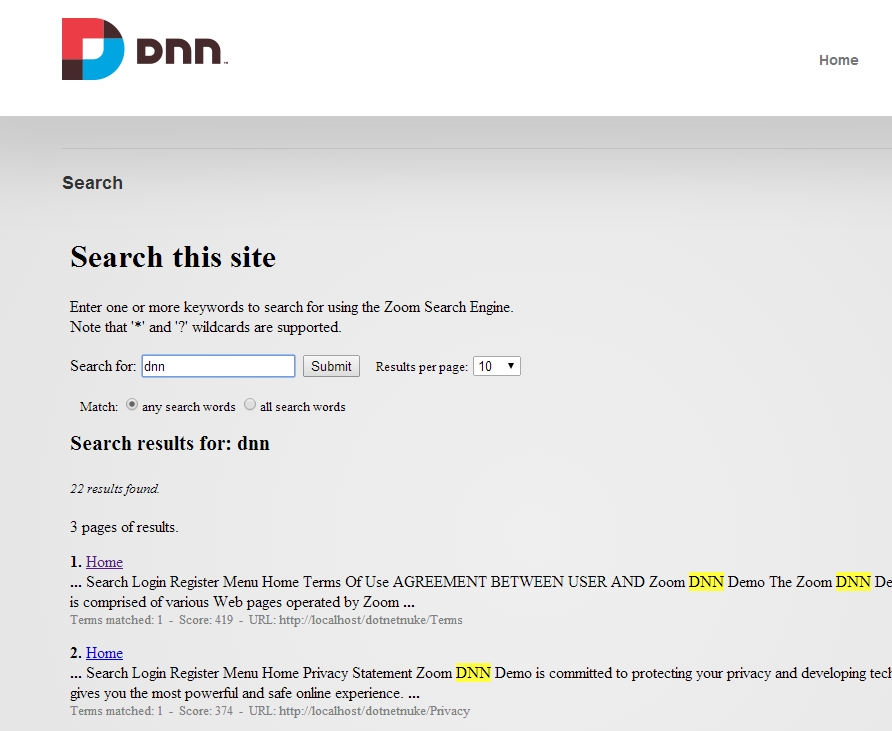
Run a few test searches and you should find that everything should be working within your new DNN search page.
If you wish to modify the text or layout (or the colours and fonts of the search results) within the IFrame, you will need to change the "search_template.html" file. Please see chapter 6 of the Users Guide ("How do I customize the look of my search page?") for more information.
Note: You may notice that when you click on a search result, the link opens within the IFrame of the search page. If you wish to change this behaviour, go to the Zoom Configuration window, and select the "Search Page" tab. Under "Results linking", change the selected option to "Frame or window:" and enter "_top" (without the quote characters, but note that the underscore is important) in the text box next to this option. Re-index your website and upload the files for this change to take effect. You will now find your search result links will open outside of the IFrame.
Additional note: If you make the IFRAME very tall, you'll find that when you click on the "Next >>" results link down at the bottom of the search results page, the browser would not scroll back to the top of the frame automatically. To fix this, edit your "search_template.html" file and replace the <body> tag with the following:
<body onload="location.href='#'">
Best DotNetNuke Hosting Recommendation
ASPHostPortal.com provides its customers with Plesk Panel, one of the most popular and stable control panels for Windows hosting, as free. You could also see the latest .NET framework, a crazy amount of functionality as well as Large disk space, bandwidth, MSSQL databases and more. All those give people the convenience to build up a powerful site in Windows server. ASPHostPortal.com offers DotNetNuke hosting starts from $5/month only. We also guarantees 30 days money back and guarantee 99.9% uptime. If you need a reliable affordable DotNetNuke Hosting, we should be your best choice.