
Junie 25, 2015 06:09 by
 Dan
DanDNN 7 allows customization of the registration form via an easy interface, with intellisense. You just select "Custom" for Registration Form Type in Admin - Site Settings - User Account Settings tab and you can add all the fields you like to your registration form.
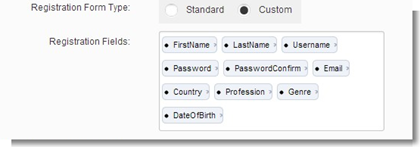
At the moment of writing, this doesn't seem to work well with custom registration properties (i.e. fields you have created yourself via the "Profile Settings - Add New Profile Property button below on the same tab). If you try to type a custom property's name on the Registration Fields box, it just won't come up (although it's been reported that properties of datatype "Text" do come up).
In order to make these properties available to your registration form until a fix is applied to this, you can use SSMS (provided that you have access and experience using it) and do the following:
- Go to your DNN database
- Open the "PortalSettings" table for edit and find the record that has the value "Registration_RegistrationFields" in the "SettingName" field
- You'll see that the "SettingValue" field is a comma-delimited list containing the field aliases of the properties that are to be displayed on the custom registration form. Add the aliases of your own fields in the list.
- Update the table and go to your DNN installation (as the Host user), and click on Tools - Clear Cache
- If everything goes well, you'll see that the "Registration Fields" box now contains your properties too, and they will appear normally on the registration form.

Another way to do this is to use the Host - SQL section on your DNN installation. To see the current profile properties that are displayed on the custom registration form, type this into the Script box and click "Run Script":
SELECT
SettingValue
FROM {databaseOwner}{objectQualifier}PortalSettings
WHERE
SettingName = 'Registration_RegistrationFields'
In order to add one or more fields at the end of the list, you must run something like this (where 'MyField' is your custom field's alias). Remember the comma and use no spaces.
UPDATE
{databaseOwner}{objectQualifier}PortalSettings
SET
SettingValue = SettingValue + ',MyField'
WHERE
SettingName = 'Registration_RegistrationFields'
After you run it, go to Tools and click Clear Cache and you will see your fields on the "Registration Fields" box in the Admin - Site Settings - User Account Settings tab.
If you still need more power and customization with your custom registration page, take a look at the Dynamic Registration module from Datasprings - at the moment of writing this, version 5.0 has just been released for DNN 7.x.
Best DotNetNuke Hosting Recommendation
ASPHostPortal.com provides its customers with Plesk Panel, one of the most popular and stable control panels for Windows hosting, as free. You could also see the latest .NET framework, a crazy amount of functionality as well as Large disk space, bandwidth, MSSQL databases and more. All those give people the convenience to build up a powerful site in Windows server. ASPHostPortal.com offers DotNetNuke hosting starts from $0. We also guarantees 30 days money back and guarantee 99.9% uptime. If you need a reliable affordable DotNetNuke Hosting, we should be your best choice.