
November 21, 2016 10:54 by
 Dan
Dan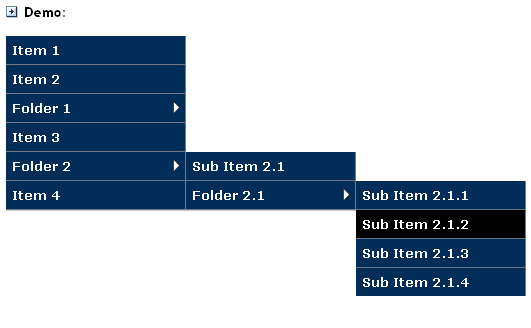
According to bytutorial website. This tutorial will show you how you can create your web design menu in css vertical layout step by step.
Firstly create a html file named it css_flyoutverticalmenu.html and copy the following code.
<link href="css_flyoutverticalmenu.css" type="text/css" rel="Stylesheet" />
<div id="menuwrapper">
<ul>
<li><a href="#">Home</a></li>
<li><a href="#">Products</a>
<ul>
<li><a href="#">Product 1</a>
<ul>
<li><a href="#">Sub Product 1</a></li>
<li><a href="#">Sub Product 2</a></li>
<li><a href="#">Sub Product 3</a></li>
</ul>
</li>
<li><a href="#">Product 2</a></li>
<li><a href="#">Product 3</a></li>
</ul>
</li>
<li><a href="#">About Us</a>
<ul>
<li><a href="#">Faqs</a></li>
<li><a href="#">Contact Us</a></li>
<li><a href="#">Where are we?</a></li>
</ul>
</li>
<li><a href="#">Help</a>
</ul>
</div>
Second step is to create a css file and named it as css_flyoutverticalmenu.css, please place this file on the same folder of the html file you created above.
/* Define the body style */
body {
font-family:Arial;
font-size:12px;
}
/* We remove the margin, padding, and list style of UL and LI components */
#menuwrapper ul, #menuwrapper ul li{
margin:0;
padding:0;
list-style:none;
}
/* We apply background color and border bottom white and width to 150px */
#menuwrapper ul li{
background-color:#7f95db;
border-bottom:solid 1px white;
width:150px;
cursor:pointer;
}
/* We apply the background hover color when user hover the mouse over of the li component */
#menuwrapper ul li:hover{
background-color:#6679e9;
position:relative;
}
/* We apply the link style */
#menuwrapper ul li a{
padding:5px 15px;
color:#ffffff;
display:inline-block;
text-decoration:none;
}
/**** SECOND LEVEL MENU ****/
/* We make the position to absolute for flyout menu and hidden the ul until the user hover the parent li item */
#menuwrapper ul li ul{
position:absolute;
display:none;
}
/* When user has hovered the li item, we show the ul list by applying display:block, note: 150px is the individual menu width. */
#menuwrapper ul li:hover ul{
left:150px;
top:0px;
display:block;
}
/* we apply different background color to 2nd level menu items*/
#menuwrapper ul li ul li{
background-color:#cae25a;
}
/* We change the background color for the level 2 submenu when hovering the menu */
#menuwrapper ul li:hover ul li:hover{
background-color:#b1b536;
}
/* We style the color of level 2 links */
#menuwrapper ul li ul li a{
color:#454444;
display:inline-block;
width:120px;
}
/**** THIRD LEVEL MENU ****/
/* We need to hide the 3rd menu, when hovering the first level menu */
#menuwrapper ul li:hover ul li ul{
position:absolute;
display:none;
}
/* We show the third level menu only when they hover the second level menu parent */
#menuwrapper ul li:hover ul li:hover ul{
display:block;
left:150px;
top:0;
}
/* We change the background color for the level 3 submenu*/
#menuwrapper ul li:hover ul li:hover ul li{
background:#86d3fa;
}
/* We change the background color for the level 3 submenu when hovering the menu */
#menuwrapper ul li:hover ul li:hover ul li:hover{
background:#358ebc;
}
/* We change the level 3 link color */
#menuwrapper ul li:hover ul li:hover ul li a{
color:#ffffff;
}
/* Clear float */
.clear{
clear:both;
}
Issue for Internet Explorer under version 9
If you are using IE under version 9, it might not work for you because the browser doesnt support the hover function in LI list. I have included a javascript example in the demo file, so you can check it out how it works in Internet Explorer.
Best Recommended DotNetNuke Hosting
ASPHostPortal.com is the leading provider of Windows hosting and affordable DotNetNuke Hosting. DotNetNuke Hosting from ASPHostPortal.com provides a safe, reliable and performance-driven foundation for your DotNetNuke website. DotNetNuke is the perfect Content Management System for managing and developing your website with one of ASPHostPortal’s Hosting plans. ASPHostPortal has ability to support the latest Microsoft and ASP.NET technology, such as: WebMatrix, WebDeploy, Visual Studio 2015, .NET 5/ASP.NET 4.5.2, ASP.NET MVC 6.0/5.2, Silverlight 6 and Visual Studio Lightswitch, ASPHostPortal guarantees the highest quality product, top security, and unshakeable reliability, carefully chose high-quality servers, networking, and infrastructure equipment to ensure the utmost reliability.