
September 25, 2015 14:38 by
 Dan
DanDotNetNuke 7.2.0: Prevent "Getting Started Page" for SuperUsers
In DNN 7.2.0 has been added "Getting Started Page" for Super Users. It looks like this:
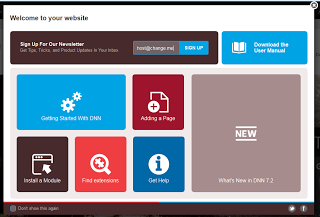
So, "Getting Started Page" appears on the next conditions:
Current User is SuperUser.
Current TabID is equal to the param "GettingStartedTabId" (for current Portal) from the "PortalSettings" table.
Setting "EnableGettingStartedPage" from the "HostSettings" table should be equal "True".
You can hide this message in few ways:
Just tick a checkbox "Don't show this again" at the bottom left corner. But this will hide "Getting Started Page" for current SuperUser only, and will show it for other SuperUsers.
Change "EnableGettingStartedPage" setting from the "HostSettings" table to "false". After this change, "Getting Started Page" will not be displayed for all SuperUsers.
If you like to change it for all future installations you plan to do, then you can edit "Install/DotNetNuke.install.config.resources" file in your installation package. In this file you can find "<EnableGettingStartedPage>True</EnableGettingStartedPage>", what is very easy to change to "False".
BTW: I have not found a way on how to change "EnableGettingStartedPage" setting from the "HostSettings" at the FrontEnd.
Best DotNetNuke Hosting Recommendation
ASPHostPortal.com provides its customers with Plesk Panel, one of the most popular and stable control panels for Windows hosting, as free. You could also see the latest .NET framework, a crazy amount of functionality as well as Large disk space, bandwidth, MSSQL databases and more. All those give people the convenience to build up a powerful site in Windows server. ASPHostPortal.com offers DotNetNuke hosting starts from $5. We also guarantees 30 days money back and guarantee 99.9% uptime. If you need a reliable affordable DotNetNuke Hosting, we should be your best choice.