
Oktober 31, 2016 09:06 by
 Dan
Dan
According to Ben J Schmidt (web designer) article, Let's face it, if you have a website, you are dying to know how many page views your site is getting and just how effective all your ads and SEO is working. Thanks to Google Analytics for DNN, it is easier than ever.
Google Analytics is a free, fully featured website tracking system. It can even synced with Google Adwords to track how different ads work with getting visitors and conversions on your site.
How does Google Analytics work?
A piece of javascript is inserted into any page you want tracked by Google. Every time a viewer looks at your website, it is recorded by Google and tells you all of the pages they viewed with in your website. All the data is collected and stored in your Google account under Analytics.
Integrating Goolge Analytics Into Your Site
Putting javascript into a site can be tough, especially if its already been made or the website is template. However, if you are using DNN, as your content management system, it's as easy as 1,2,3, thanks to the DotNetNuke Google Analytics module. This is a free module that can easily be integrated into your pre-existing Dot Net Nuke site. This module puts the javascript for Google Analytics into your DNN page. The Google Analytics module is a light-weight module that has been designed not to place a heavier load on your website.
Installing your Module on DNN 6:
- Login/setup an account at Google Analytics
- Login to your DNN Portal as a superuser or host account
- Rollover host and go to extensions. Click on the Available Extensions Tab.
- Click on the install button next to the Google Analytics module. After the module has been installed, it will appear under the 'Module' drop down list in the Control Panel, under the name "Google Analytics."
- On the homepage of your DotNetNuke portal, click 'Add New Module' and add the "Google Analytics" to the page. You will be able to physically see the module in 'Edit' mode, but the module will disappear once logged out of DNN.
- To have all pages on your website tracked, click on the 'Settings' control for the Google Analytics module you created, then click on the 'Advanced Settings' section and check the 'Display Module on All Pages'.
This is a great and simple module that allows you to easily check your traffic and look for areas that need some touch ups.
Best Recommended DotNetNuke Hosting
ASPHostPortal.com is the leading provider of Windows hosting and affordable DotNetNuke Hosting. DotNetNuke Hosting from ASPHostPortal.com provides a safe, reliable and performance-driven foundation for your DotNetNuke website. DotNetNuke is the perfect Content Management System for managing and developing your website with one of ASPHostPortal’s Hosting plans. ASPHostPortal has ability to support the latest Microsoft and ASP.NET technology, such as: WebMatrix, WebDeploy, Visual Studio 2015, .NET 5/ASP.NET 4.5.2, ASP.NET MVC 6.0/5.2, Silverlight 6 and Visual Studio Lightswitch, ASPHostPortal guarantees the highest quality product, top security, and unshakeable reliability, carefully chose high-quality servers, networking, and infrastructure equipment to ensure the utmost reliability.
Oktober 25, 2016 09:11 by
Dan
ASPHostPortal.com is a web hosting provider dedicated to providing high quality Docker hosting at an affordable price. We care for the clients, ensuring each and every client is more than just satisfied day in and day out. We only use the best hardware, super fast network, covered by 24/7 Support Team. We have 12 world class data centers, located on 12 different countries. Each of locations will provide with amazing performance. Today, we offer high quality Docker hosting at cheap rate.
Docker is the world’s leading software containerization platform. Docker enables developers and IT admins to build, ship and run any application, anywhere. Docker's commercial solutions provide an out of the box CaaS environment that gives IT Ops teams security and control over their environment, while enabling developers to build applications in a self service way. With a clear separation of concerns and robust tooling, organizations are able to innovate faster, reduce costs and ensure security.
Docker gives teams the choice to leverage any infrastructure whether in the cloud, on VMs or baremetal servers allowing companies to make the best business decision for them. Docker containers spin up and down in seconds, making it easy to scale application services to satisfy peak customer demand, and then reduce running containers when demand ebbs.
ASPHostPortal.com offers Docker Hosting with expert team support. We offer Docker hosting with affordable price, a lot of features, 99.99% uptime guarantee, 24/7 support, and 30 days money back guarantee. We strive to make sure that all customers have the finest web-hosting experience as possible. To learn more about our Docker Hosting, please visit http://asphostportal.com/Docker-Hosting.aspx
About ASPHostPortal.com:
ASPHostPortal.com is The Best, Cheap and Recommended ASP.NET & Linux Hosting. ASPHostPortal.com has ability to support the latest Microsoft, ASP.NET, and Linux technology, such as: such as: WebMatrix, Web Deploy, Visual Studio, Latest ASP.NET Version, Latest ASP.NET MVC Version, Silverlight and Visual Studio Light Switch, Latest MySql version, Latest PHPMyAdmin, Support PHP, etc. Their service includes shared hosting, reseller hosting, and Sharepoint hosting, with speciality in ASP.NET, SQL Server, and Linux solutions. Protection, trustworthiness, and performance are at the core of hosting operations to make certain every website and software hosted is so secured and performs at the best possible level.
Oktober 24, 2016 12:45 by
Dan
According to Grace Hughes article, DotNetNuke, often referred to as DNN Evoq is among the best open source CMS systems available on the internet. Since its inception it has proven itself to be a top performer with respect to effective management of a website system.
However, there are still a number of other CMS systems such as WordPress, Joomla and Drupal that continue to remain popular choices among developers and systems administrators.
How does DNN compare with these systems?
It is good to know that many of the best websites on the internet today have been developed by DNN developers. This framework continues to improve with each coming year, providing developers a chance to explore its skins, default layers and modules that just keep getting better and better.
The skinning engine is extremely user-friendly and flexible and so are the security access, groupings and role assignments. A major benefit DNN offers over its competitors is the fact that its admin is entirely integrated into the website, allowing web administrators to easily make changes as and when required. Customization on DNN is also extremely simple.
DNN versus WordPress
DotNetNuke and WordPress are both excellent platforms for those who wish to build web presence. However, DotNetNuke is definitely more powerful and easy to use. On the other hand, WordPress is easier to set up and install, but the new DotNetNuke Evoq has done a good job towards bridging that gap. Both these frameworks are fast enough, but since WordPress uses PHP and MYSQL it is slightly faster. Furthermore, WordPress is an ideal platform specific for blogging. This means that many developers do not even consider it a real CMS. WordPress has introduced few upgrades and changes over the years, while DNN works hard to introducing some interesting upgrades with every new version.
In conclusion, if you had to make a choice, hiring a DNN developer should be your first one unless you intend to create a site that is purely content, SEO centric containing blogs.
DNN versus Joomla
The choice between DNN and Joomla is slightly more complex. Joomla continues to show improvements as a CMS, but as soon as it started gaining acceptance, Magento came in and stole all the attention. One of the bigger problems with this framework is that it does not work very well with Windows, especially when compared to DNN. Joomla administration functions are more complex than that of DotNetNuke. This means new DNN developers take lesser time to get used to the administration as compared to the Joomla counterparts.
Joomla is also week with respect to security, especially with groupings. You will need to use some 3rd party modules to solve this problem.
DNN versus Drupal
When comparing these two CMS systems, it has been often concluded that DNN works better in Internet Explorer. On the hand, if you wish to gain better performance on FireFox, Drupal should be your choice. Drupal is written in PHP, and isn't as popular as other CMS systems available. As a matter of fact, only about 2% of the websites on the Internet use this framework. This framework is primarily used by personal blogs and government websites. DNN is definitely the preferred choice if you wish to create a website that is scalable.
Before you close on a CMS framework make sure you speak with your DotNetNuke developers understand the scope of your website and how this framework will help you achieve your internet objectives.
Best Recommended DotNetNuke Hosting
ASPHostPortal.com is the leading provider of Windows hosting and affordable DotNetNuke Hosting. DotNetNuke Hosting from ASPHostPortal.com provides a safe, reliable and performance-driven foundation for your DotNetNuke website. DotNetNuke is the perfect Content Management System for managing and developing your website with one of ASPHostPortal’s Hosting plans. ASPHostPortal has ability to support the latest Microsoft and ASP.NET technology, such as: WebMatrix, WebDeploy, Visual Studio 2015, .NET 5/ASP.NET 4.5.2, ASP.NET MVC 6.0/5.2, Silverlight 6 and Visual Studio Lightswitch, ASPHostPortal guarantees the highest quality product, top security, and unshakeable reliability, carefully chose high-quality servers, networking, and infrastructure equipment to ensure the utmost reliability.
Oktober 11, 2016 19:45 by
Dan
ASPHostPortal.com was established on the goal to provide high quality hosting services for everyone. We care for the clients, ensuring each and every client is more than just satisfied day in and day out. Our company is passionate about hosting and strive to deliver an excellent level of service to each customer. Now, we offer reliable Drupal 8.2 hosting with good server performance.
Drupal 8.2 is a minor version (feature release) of Drupal 8 and is ready for use on production sites. This minor release provides new improvements and functionality without breaking backward compatibility (BC) for public APIs. Note that there may be changes in internal APIs and experimental modules that require updates to contributed and custom modules and themes per Drupal core's backwards compatibility and experimental module policies.
Place Block is the new Drupal 8.2.x feature allows the user to place a block on any page and see the region where it will be displayed, without having to navigate to a backend administration form.
ASPHostPortal.com is set up with an aim to serve customers in an excellent manner by providing them quality service. We offer Drupal 8.2 hosting with affordable price, a lot of features, 99.99% uptime guarantee, 24/7 support, and 30 days money back guarantee. We strive to make sure that all customers have the finest web-hosting experience as possible. To learn more about our Drupal 8.2 Hosting, please visit http://asphostportal.com/Drupal-Hosting.aspx
About ASPHostPortal.com:
ASPHostPortal.com is The Best, Cheap and Recommended ASP.NET & Linux Hosting. ASPHostPortal.com has ability to support the latest Microsoft, ASP.NET, and Linux technology, such as: such as: WebMatrix, Web Deploy, Visual Studio, Latest ASP.NET Version, Latest ASP.NET MVC Version, Silverlight and Visual Studio Light Switch, Latest MySql version, Latest PHPMyAdmin, Support PHP, etc. Their service includes shared hosting, reseller hosting, and Sharepoint hosting, with speciality in ASP.NET, SQL Server, and Linux solutions. Protection, trustworthiness, and performance are at the core of hosting operations to make certain every website and software hosted is so secured and performs at the best possible level.
Oktober 10, 2016 21:26 by
Dan
Admit it. Those little questionmark help icons are ugly. Even if you replace the icon image with something more fancy, you still have to display them everywhere, even at the front-end (for example, the Feedback module uses them). And, if you’re developing for more than one language, that creates an awful lot of work for you, since you have to translate all texts that appear as tooltips when you hover over the icons.
There’s an easy way to hide them, though, and it’s site-wide. It will also apply to any third-party modules that use the dnn label control for providing labels for form controls.
Go to controls\labelcontrol.ascx and change the following line:
<asp:image id="imgHelp" runat="server" imageurl="~/images/help.gif" enableviewstate="False" />
to
<asp:image visible="false" id="imgHelp" runat="server" imageurl="~/images/help.gif" enableviewstate="False" />
That’s right. A visible=”false” attribute and the icons will disappear.
Also, if you notice that the labels are shifted to the left a bit (especially in IE), then go two lines above and change the line:
<span style="width:15px">
to
<span style="width:0px">
Or delete the span tag all together.
You can find a relevant thread on DotNetNuke.com with some more tips and tricks for the labelcontrol.ascx file here.
Have fun!
Best Recommended DotNetNuke Hosting
ASPHostPortal.com is the leading provider of Windows hosting and affordable DotNetNuke Hosting. DotNetNuke Hosting from ASPHostPortal.com provides a safe, reliable and performance-driven foundation for your DotNetNuke website. DotNetNuke is the perfect Content Management System for managing and developing your website with one of ASPHostPortal’s Hosting plans. ASPHostPortal has ability to support the latest Microsoft and ASP.NET technology, such as: WebMatrix, WebDeploy, Visual Studio 2015, .NET 5/ASP.NET 4.5.2, ASP.NET MVC 6.0/5.2, Silverlight 6 and Visual Studio Lightswitch, ASPHostPortal guarantees the highest quality product, top security, and unshakeable reliability, carefully chose high-quality servers, networking, and infrastructure equipment to ensure the utmost reliability.
Oktober 9, 2016 06:58 by
Dan
DotNetNuke is easily one of the most popular ASP.Net content management (CMS) systems out there. In this post I am going to cover some of the simplest, fastest things you can do to your DotNetNuke site in order to improve SEO. If your first question was "What is SEO?" then this post is for you. If you are familiar with SEO and want a quick refresher that pertains specifically to DotNetNuke then this post is for you. If you have already carefully tuned your site and are looking for advanced optimization techniques, go hire a marketing professional with a proven track record of SEO success.
So, what is SEO? The term SEO stands for Search Engine Optimization and it essentially means tweaking your site to make it more search-friendly. A search-friendly site makes it much easier for your current and potential customers to locate your site and to find what they need on your site. The end-goal of SEO is often more specifically about getting into one of the coveted top spots in Google's search results for a particular term or phrase. While achieving that goal usually takes a lot more than the simple tips presented in this post (for example, Google's ranking depends a lot on the number and types of other sites that link to you), these tips will get you started on the right path and will make your site more useful and usable in the process.
DO use a DotNetNuke (DNN) skin that is web standards-based and follows current recommended practices for accessible content. A good skin will probably note that it is XHTML or HTML5 compliant and may display a small W3C icon indicating that its code validates properly. The W3C is the internationally-recognized body responsible for setting standards that govern key web technologies. A good skin will not use tables for layout. You may also see references to Section 508, which refers to standards set forth in US law for make a site accessible to all users including those using screen readers and other assistive technology. Section 508-compliant sites tend to also be extremely search-friendly as they will include additional text and meta-data to serve assistive technology that is also useful to the robots used by Google, Bing, Yahoo and others.
DON'T make any key text into an image. In fact, avoid making any text into an image at all. Search engines cannot read any text from an image, and neither can screen readers for visually-impaired users. Web font services such as Typekit, Webtype and Google Web Fonts make it easier than ever to replace images with plain text and maintain custom styling. If you must use an image for text, make sure that you properly define the alt tag of the image. This is something that is absolutely essential to do for all images on your site, not just those that contain text. In DotNetNuke you typically set up this text in the properties area when inserting an image. You can also configure an additional long description through this dialog where appropriate.
DO take advantage of the site-wide and page-level descriptions and keywords available in DNN. Most themes will use these elements in the header meta-tags of your site. While search engines never rely on keyword tags alone for indexing, these keywords can be useful for pointing out to the search engine which words on the page are particularly important. On the other hand, the description is typically used by search engines as the snippet that will be displayed in their search results. For this reason you should keep it short, to-the-point and self-explanatory. This is your chance to grab the attention of someone who is quickly scanning a search results page for relevant links. The site-wide description will often be used when no page-level description is present but you should always override it with a more specific description per page when possible to prevent the appearance of duplicate content and to give a better idea of what is actually on each page. You can set the description and keywords for the entire site in Site Settings and for an individual page while editing that page.
DON'T post misleading content, duplicate content on multiple pages or rip content from other sites on the web. Google in particular is known to penalize this type of behavior. This should be an obvious one as it is also clearly an ethical issue. The best way to attract the customers that are right for you is to post authentic, original content that benefits them in some way. If you find an article elsewhere that you think may be beneficial to your customers the best thing to do is to write your own post adding value to the discussion, including one or two short, properly-attributed quotes and linking to the full text on the original site. Who knows, this neighborly behavior could even lead to a productive relationship with the author of the content and perhaps a link back to your site from theirs at some future date.
DO update frequently, write plenty of informative text and try to include the words and phrases that you think customers will use when trying to search for the content you have written. Pay attention to the types of questions your customers are asking and how they are asking them. Try to think like a customer when writing and use the same terms that they would be likely to use when searching. Mention those things which are most distinguishing about you and that you want others to find out about you. By doing this not only will you make your content rank higher in search results but you will also make it far more relevant to your customers themselves. It is also a very good idea to include the keywords you identify in the titles of your pages or posts whenever it makes sense to do so - search engines tend to place special emphasis on URLs and titles.
DON'T rename or move pages unless absolutely necessary (and even then seriously consider creating a redirect from the old location to the new one). I should really say don't rename or move pages ever. Changing the structure of your site can cause dead links both internally and externally. If someone has bookmarked a particular location or linked to it from a blog, web site or tweet and you move or rename that page the link will stop working and you will end up with missed opportunities and frustrated and alienated customers. Restructuring your site can also lead to a (usually temporary) search ranking penalty until your site is re-indexed by every major search provider. If you must move a page you can create a placeholder at the old location and use the DNN link/redirect options to make sure that people with only the old URL will still end up in the right place.
DO use the semantic nature of HTML to add value to your content. An < h1 > (Heading 1) tag should be the most important heading on your page. < h2 > should be next and so forth, like an outline. The < p > should separate paragraphs. Addresses should be indicated with < address > and lists with < ul > (unordered) or < ol > (ordered). Links created with the < a > tag should include title attributes. Like many of the previous tips, producing well structured content helps both search engines and assistive devices parse your site with greater success. It also starts you down the path towards microformats and some of the advanced and exciting things being done with them. DNN makes at least the basics of this relatively easy without editing the actual code. You can simply choose the tag that will be used from the built in editor. When you do this, just remember that you are describing the text as well as styling it.
Best Recommended DotNetNuke Hosting
ASPHostPortal.com is the leading provider of Windows hosting and affordable DotNetNuke Hosting. DotNetNuke Hosting from ASPHostPortal.com provides a safe, reliable and performance-driven foundation for your DotNetNuke website. DotNetNuke is the perfect Content Management System for managing and developing your website with one of ASPHostPortal’s Hosting plans. ASPHostPortal has ability to support the latest Microsoft and ASP.NET technology, such as: WebMatrix, WebDeploy, Visual Studio 2015, .NET 5/ASP.NET 4.5.2, ASP.NET MVC 6.0/5.2, Silverlight 6 and Visual Studio Lightswitch, ASPHostPortal guarantees the highest quality product, top security, and unshakeable reliability, carefully chose high-quality servers, networking, and infrastructure equipment to ensure the utmost reliability.
Oktober 4, 2016 23:12 by
Dan
Today I just got a very annoying error with one DNN7 fresh installation in Windows 7 x64 machine. Which is;
Compiler Error Message: CS0016: Could not write to output file 'c:\Windows\Microsoft.NET\Framework\v4.0.30319\Temporary ASP.NET Files\DNN7\62d43c41\27d749ca\xx_xxx.dll' – 'Access denied.'
Here is solution which I have found. What you have to do is just assign the following folders with IIS_IUSRS and NETWORK SERVICE users with the full control permission:
- C:\Windows\temp
- C:\Windows\Microsoft.NET\Framework\v4.0.30319\Temporary ASP.NET Files
Once you applied those setting, restart your IIS and try to run your application again. The error should be gone by now.
Hope that this post will help you to fix the problem as I did and if you have found any other fix's please leave feedback and I will post them up.
Best Recommended DotNetNuke Hosting
ASPHostPortal.com is the leading provider of Windows hosting and affordable DotNetNuke Hosting. DotNetNuke Hosting from ASPHostPortal.com provides a safe, reliable and performance-driven foundation for your DotNetNuke website. DotNetNuke is the perfect Content Management System for managing and developing your website with one of ASPHostPortal’s Hosting plans. ASPHostPortal has ability to support the latest Microsoft and ASP.NET technology, such as: WebMatrix, WebDeploy, Visual Studio 2015, .NET 5/ASP.NET 4.5.2, ASP.NET MVC 6.0/5.2, Silverlight 6 and Visual Studio Lightswitch, ASPHostPortal guarantees the highest quality product, top security, and unshakeable reliability, carefully chose high-quality servers, networking, and infrastructure equipment to ensure the utmost reliability.
Oktober 4, 2016 23:06 by
Dan
ASPHostPortal.com has provided reliable Windows ASP.NET hosting plans, at the lowest prices, for the best services possible, on fastest nodes ever. We strongly believe in high quality standards and Hence, the customer will always find our services better than every other host in this industry. We provide Windows ASP.NET hosting plans on high performance servers and high-speed internet connection in the world. Now, we offer reliable ASP.NET Core 1.0.1 hosting with Best 24/7 customer support.
Microsoft this week released updates to ASP.NET Core, .NET Core and Entity Framework Core that consisted mainly of a growing list of fixes. Among the fix rollup is one that plugs up a potential security breakdown within ASP.NET Core. Microsoft details the issue in a TechNet security bulletin that was released at the same time.
According to the bulletin, the issue affects "the public version of ASP.NET Core MVC 1.0.0 whereView Components could receive incorrect information, including details of the current authenticated user." The bulletin goes on to explain that "If a View Component depends on the vulnerable code and makes decisions based on the current user, then the View Component could make incorrect decisions that result in elevation of privilege."
ASPHostPortal.com is set up with an aim to serve customers in an excellent manner by providing them quality service. We offer ASP.NET Core 1.0.1 hosting with affordable price, a lot of features, 99.99% uptime guarantee, 24/7 support, and 30 days money back guarantee. We strive to make sure that all customers have the finest web-hosting experience as possible. To learn more about our ASP.NET Core 1.0.1 Hosting, please visit http://asphostportal.com/ASPNET-Core-1-0-Hosting.aspx
About ASPHostPortal.com:
ASPHostPortal.com is The Best, Cheap and Recommended ASP.NET & Linux Hosting. ASPHostPortal.com has ability to support the latest Microsoft, ASP.NET, and Linux technology, such as: such as: WebMatrix, Web Deploy, Visual Studio, Latest ASP.NET Version, Latest ASP.NET MVC Version, Silverlight and Visual Studio Light Switch, Latest MySql version, Latest PHPMyAdmin, Support PHP, etc. Their service includes shared hosting, reseller hosting, and Sharepoint hosting, with speciality in ASP.NET, SQL Server, and Linux solutions. Protection, trustworthiness, and performance are at the core of hosting operations to make certain every website and software hosted is so secured and performs at the best possible level.
September 27, 2016 23:14 by
Dan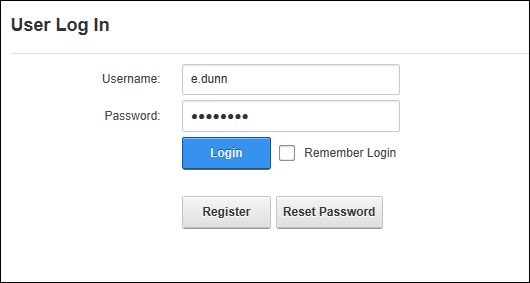
First time/novice users generally tend to do a lot of R&D after installing dotnetnuke, that's when there is a possibility that your host account might get locked up.
Here's a quick way to get around this problem :
Case 1:
Current skin and container on your dotnetnuke installation is the default skin and container.In which case you should be able to see the Register link before the login link on the home page.
In this case follow the points mentioned below -
Go to the home page of your browser.
Click the "Register" link and create a new user.
Go to the database of the dotnetnuke installation.
Open the Sql server query analyser and execute "Select * from users"
You should see your user in the list, execute
"UPDATE Users
SET IsSuperUser = 1
WHERE UserID = "
Now log into the site, You should be able to log into the site and then in the Host->Host Accounts.
Search for your original host account, edit it and click the "Manage Password" link.
Since you have forgotten your current password keep that textbox blank, Enter the new password and confirm it.
Click the "Change Password" link.
Log out of the site.
Log in with the original host user now.
Once you are able to log in the site as your original host user go back to the database and execute
UPDATE Users
SET IsSuperUser = 0
WHERE UserID =" this will reset the new user to a normal user (Remember that we had set this normal user as a host user).
Case 2:
Current skin and container on your dotnetnuke installation is your custom skin and container.In this case you may or may not have the "Register" link on your homepage.
In this case follow the same steps from steps -3 till the end.
That's it you have successfully changed your host account password.
Best Recommended DotNetNuke Hosting
ASPHostPortal.com is the leading provider of Windows hosting and affordable DotNetNuke Hosting. DotNetNuke Hosting from ASPHostPortal.com provides a safe, reliable and performance-driven foundation for your DotNetNuke website. DotNetNuke is the perfect Content Management System for managing and developing your website with one of ASPHostPortal’s Hosting plans. ASPHostPortal has ability to support the latest Microsoft and ASP.NET technology, such as: WebMatrix, WebDeploy, Visual Studio 2015, .NET 5/ASP.NET 4.5.2, ASP.NET MVC 6.0/5.2, Silverlight 6 and Visual Studio Lightswitch, ASPHostPortal guarantees the highest quality product, top security, and unshakeable reliability, carefully chose high-quality servers, networking, and infrastructure equipment to ensure the utmost reliability.
September 27, 2016 19:50 by
Dan
Established in 2008, ASPHostPortal.com is one of the leading ASP.NET hosting provider offering quality Moodle Hosting with premium support. We maintains and operates its own network. We only use the best hardware, super fast network, covered by 24/7 Support Team. Our commitment to excellence in customer support and system performance is truly what sets us apart from the competition. Now, we offer reliable Moodle 3.1.1 hosting with 99,9% uptime guarantee.
Moodle is an open source Learning Management System, used extensively in businesses. Moodle stands for "Modular Object-Oriented Dynamic Learning Environment." It is very popular with elearning developers and educators. With an impressive array of features, Moodle is capable of addressing many instructional issues.
Moodle makes it easy and convenient to provide online assessment schemes. You can readily find tracking tools and devices to effectively monitor students' performance on real-time and individual basis. Comparison among students can be done pretty thoroughly.
ASPHostPortal.com strongly believe in high quality standards and Hence you’ll always find their services better than every other host in this industry. We offer Moodle 3.1.1 hosting with affordable price, a lot of features, 99.99% uptime guarantee, 24/7 support, and 30 days money back guarantee. We strive to make sure that all customers have the finest web-hosting experience as possible. To learn more about our Moodle 3.1.1 Hosting, please visit http://asphostportal.com/Moodle-3-1-1-Hosting
About ASPHostPortal.com:
ASPHostPortal.com is The Best, Cheap and Recommended ASP.NET & Linux Hosting. ASPHostPortal.com has ability to support the latest Microsoft, ASP.NET, and Linux technology, such as: such as: WebMatrix, Web Deploy, Visual Studio, Latest ASP.NET Version, Latest ASP.NET MVC Version, Silverlight and Visual Studio Light Switch, Latest MySql version, Latest PHPMyAdmin, Support PHP, etc. Their service includes shared hosting, reseller hosting, and Sharepoint hosting, with speciality in ASP.NET, SQL Server, and Linux solutions. Protection, trustworthiness, and performance are at the core of hosting operations to make certain every website and software hosted is so secured and performs at the best possible level.