
September 6, 2016 23:29 by
 Dan
Dan
Installing Google Analytics in DotNetNuke is a fairly common request from many individuals and I know it can be a quite troubling question for most. The primary questions are how and where can I put the javascript code provided by Google. Well you have a few options. First you could put the code directly in the skin for the site, the advantages to that would be that you will automatically have the code on all pages, however, the disadvantage is that you cannot use that skin as is on another portal due to the site specific Google information. I personally go the route of adding a text/html module to my site and set it to show on every page and insert the script in a very specific location which I will discuss below. There are a few drawbacks to this method. First you will not get any statistics information on traffic to "edit pages" where other modules are not displayed and you also will not receive information regarding administration modules. However, in most circumstances this shouldn't be an issue.
The best way to include this information is to include the information in the Module header of the text/html module. This is to prevent the accidental removal of the script code if you happen to click inside the module as an admin to enter in-line edit mode. Below I will walk you through the steps needed to implement Google Analytics using this method. (NOTE: you can extend this for other javascript integrations if needed).
- Add a new Text/HTML module to a page of your site, you can position it anywhere, but I recommend the bottom of the page as administrative users will still see the module when they are logged in
- Edit the text of the module to contain no text
- Enter the module settings from the SolPart Action Menu
- Expand the "Advanced Settings" section
- Check the box next to "Display Module On All Pages?"
- Insert your Javascript code in the "Header" box. This will ensure that the data is always retained
- Now under "Page Settings" -> "Basic Settings" un-check the following boxes
- Display Container
- Allow Print
- Allow Syndicate
- Ensure that the "Cache Time" is set to 0 (Caching appeared to cause issues with this implementation in my testing)
- Click "Update" to save your changes
This should complete the setup. You may now test to ensure everything is functioning correctly. You can log out as an administrator and view your site and no extra content should be displayed however if you look at the generated source you should see your javacript listed. Google Analytics should update within about 15 minutes to show that they are receiving your data.
Best Recommended DotNetNuke Hosting
ASPHostPortal.com is the leading provider of Windows hosting and affordable DotNetNuke Hosting. DotNetNuke Hosting from ASPHostPortal.com provides a safe, reliable and performance-driven foundation for your DotNetNuke website. DotNetNuke is the perfect Content Management System for managing and developing your website with one of ASPHostPortal’s Hosting plans. ASPHostPortal has ability to support the latest Microsoft and ASP.NET technology, such as: WebMatrix, WebDeploy, Visual Studio 2015, .NET 5/ASP.NET 4.5.2, ASP.NET MVC 6.0/5.2, Silverlight 6 and Visual Studio Lightswitch, ASPHostPortal guarantees the highest quality product, top security, and unshakeable reliability, carefully chose high-quality servers, networking, and infrastructure equipment to ensure the utmost reliability.
September 6, 2016 20:10 by
Dan
ASPHostPortal.com provides affordable and high performance Drupal 8.1.8 hosting to customers around the world. Our company is passionate about hosting and strive to deliver an excellent level of service to each customer. We strongly believe in high quality standards and Hence customers will always find our services better than every other host in this industry. Today, we announce the availability of Drupal 8.1.8 hosting with reliable service.
Drupal 8.1.8 is a content management system offering shorter time to market, empowerment of end users to do customizations that traditionally requires software engineering, sustainability and lower total cost of ownership. It’s built, used, and supported by an active and diverse community of people around the world.
Use Drupal to build everything from personal blogs to enterprise applications. Thousands of add-on modules and designs let people build any site they can imagine. Drupal is open source software maintained and developed by a community of over 1,000,000 users and developers.
ASPHostPortal.com offers Drupal 8.1.8 Hosting with expert team support. We support this new technology with affordable price, a lot of features, 99.99% uptime guarantee, 24/7 support, and 30 days money back guarantee. We strive to make sure that all customers have the finest web-hosting experience as possible. To learn more about our Drupal 8.1.8 Hosting, please visit http://asphostportal.com/Drupal-8-1-8-Hosting
About ASPHostPortal.com:
ASPHostPortal.com is The Best, Cheap and Recommended ASP.NET & Linux Hosting. ASPHostPortal.com has ability to support the latest Microsoft, ASP.NET, and Linux technology, such as: such as: WebMatrix, Web Deploy, Visual Studio, Latest ASP.NET Version, Latest ASP.NET MVC Version, Silverlight and Visual Studio Light Switch, Latest MySql version, Latest PHPMyAdmin, Support PHP, etc. Their service includes shared hosting, reseller hosting, and Sharepoint hosting, with speciality in ASP.NET, SQL Server, and Linux solutions. Protection, trustworthiness, and performance are at the core of hosting operations to make certain every website and software hosted is so secured and performs at the best possible level.
September 1, 2016 18:46 by
ArmendHow to Install module extension in DotNetNuke ?
What is actually a module extension in DNN? A module extension can be considered as plugin program that you can install on your site. Just imagine you have a car and you want to add a new sound system to your car, this new sound system can be considered as a plugin module to enhance your car looks and feeling.
To install a module extension in DNN, you will need to use a host account known super user account. Once login on the site, you will have a menu called host. Under this menu, you will find a menu called Extensions. Please click this menu.
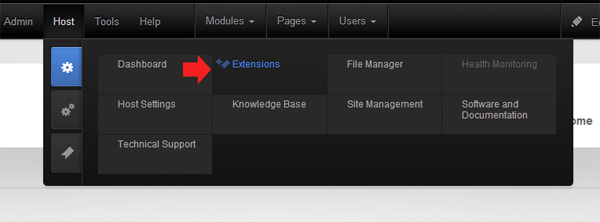
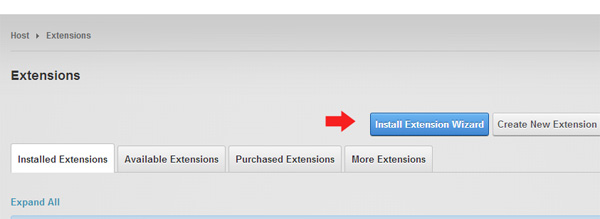
A page contains extension modules list will appear.
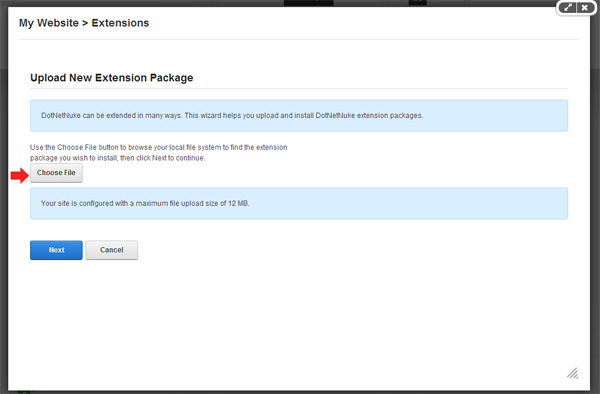
Click the browse button to select the installation file. The installation file in DNN must in .zip format.
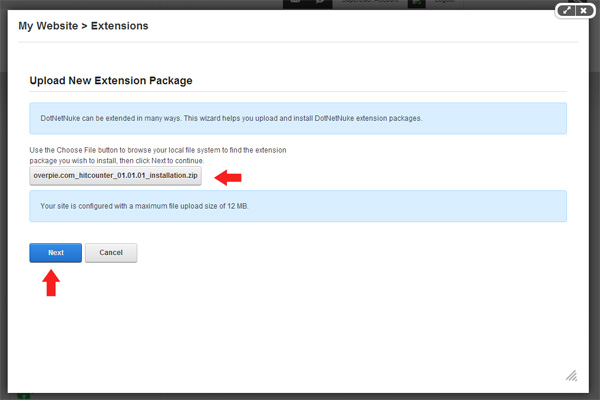
Click the Next button and you will be able to see the details of the extension specification.

If there is a release note, you will be able to see the what updates or changes that have been made.
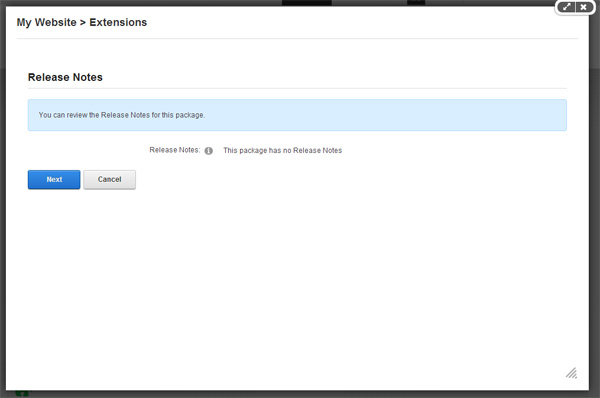
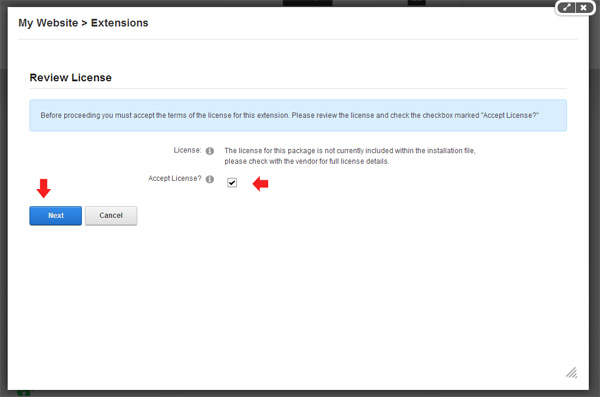
If there is a license note, you will be able to review it as well. Tick the checkbox and click Next button to accept the license.
The installation will be fully completed if you do not see any warning or red text in the scrolling installation summary process

Best Recommended DotNetNuke Hosting
ASPHostPortal.com is the leading provider of Windows hosting and affordable DotNetNuke Hosting. DotNetNuke Hosting from ASPHostPortal.com provides a safe, reliable and performance-driven foundation for your DotNetNuke website. DotNetNuke is the perfect Content Management System for managing and developing your website with one of ASPHostPortal’s Hosting plans. ASPHostPortal has ability to support the latest Microsoft and ASP.NET technology, such as: WebMatrix, WebDeploy, Visual Studio 2015, .NET 5/ASP.NET 4.5.2, ASP.NET MVC 6.0/5.2, Silverlight 6 and Visual Studio Lightswitch, ASPHostPortal guarantees the highest quality product, top security, and unshakeable reliability, carefully chose high-quality servers, networking, and infrastructure equipment to ensure the utmost reliability.