In this article, I want to describe about IIS SEO Toolkit and the YSlow plugin for FireFox. The SEO Toolkit is invaluable for finding things like broken links, bad markup, etc, while the YSlow plugin analyzes things from a pure performance perspective. I recommend both highly for fine tuning your DotNetNuke websites.
One of the things that YSlow recommends is to compress the files that are sent from the server to the user’s web browser. DotNetNuke provides the option to use GZip compression on the Host Settings page. Turning this feature on is one of the first things I do when I set up a new DotNetNuke installation.

YSlow has the following to say about compression:
“Compression reduces response times by reducing the size of the HTTP response. Gzip is the most popular and effective compression method currently available and generally reduces the response size by about 70%. Approximately 90% of today's Internet traffic travels through browsers that claim to support gzip.”
That’s great! Unfortunately, not every file on your DotNetNuke site is compressed when you enable that setting at the host level. In fact, in a test against a recent version of DotNetNuke in my local environment, YSlow reports 18 components that should be compressed. When you enable GZip compression in the DotNetNuke Host Settings, that number drops to…..17. This is due to the actual page itself being compressed (which is wonderful, don’t get me wrong). But what are the other 17 components? Static files. Namely JavaScript files (.js) and Cascading Style Sheets (.css).
Now, the fact that there so many external files its an altogether different issue that I will side-step for the purpose of this blog post. Of course I would love it if DNN had 1 dynamically created minified JS file and 1 dynamically created CSS file, period. However, that is currently not the case, and even if it was – wouldn’t you want to gzip those files as well?
Here is the compression report from a recent version of DotNetNuke that has GZip enabled:
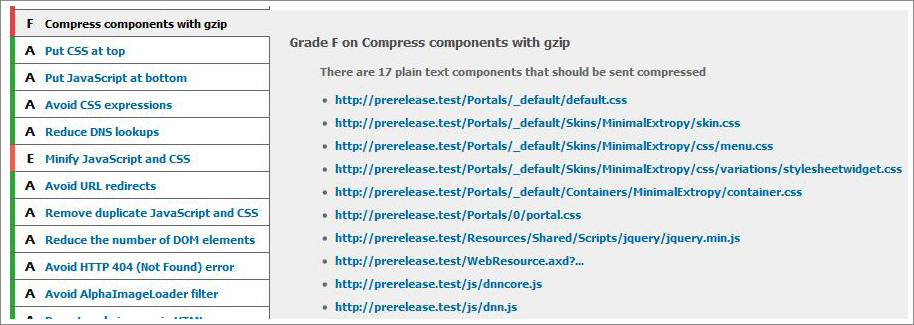
You can see that DotNetNuke does pretty darn well with respect to the YSlow configuration, except where it comes to dealing with external files (this report was run with the “Small Site or Blog” ruleset, for those that are curious). So, how can I improve this section of the YSlow report? By letting IIS gzip the static files, of course!
The report above is from a local environment, but this is exactly how dnnGallery.net behaved prior to implementing some Gzip compression in IIS.
The steps that I used to get IIS to perform GZip compression on all of the static files in my website were as follows:
1. Enable static file compression in IIS
2. Install IIS Resources
3. Add the appropriate file extensions using the IIS Metabase Explorer
4. Restart IIS
Enabling static file compression in IIS
So, first I enabled IIS compression of static files. Note that this is a server-wide solution, and will apply to each of your web sites hosted in IIS. Here are the relevant steps from the MSDN documentation:
To enable server-wide HTTP compression
1. In IIS Manager, expand the local computer, right-click the Web Sites folder, and then click Properties.
2. Click the Service tab, and in the HTTP compression section, select the Compress application files check box to enable dynamic compression.
3. Select the Compress static files check box to compress static files.
4. In the Temporary directory box, type the path to a local directory or click Browse to locate a directory. Once a static file is compressed, it is cached in this temporary directory until it expires, or the content changes. The temporary directory must be on a local drive on an NTFS-formatted partition. The directory cannot be compressed, and should not be shared.
5. Under Maximum temporary directory size, click a folder size option. If you click the Limited to (in megabytes) option and enter a number in the text box next to it, IIS automatically cleans up the temporary directory according to a least recently used rule when the set limit is reached.
6. Click Apply, and then click OK.
After I performed this step, only one random .txt file was compressed, how useful! You can check which files are compressed by looking in the temporary folder that was specified in the above steps.
Add file extensions using the Metabase Explorer
After I installed the resource kit tools, I opened the new Metabase Explorer application from my start menu and performed the following steps:
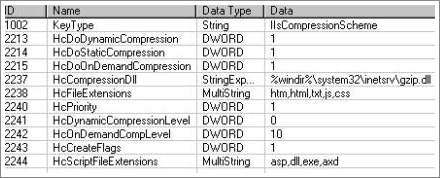
1. Expanded [Machine Name] –> W3SVC –> Filters –> Compression and selected gzip
2. For the row named “HcFileExtensions” I added “js” and “css” to the “Data” list
3. For the row named “HcScriptFileExtensions” I added “axd” to the “Data” list
Run it and you’ll see the result