
April 2, 2014 09:56 by
 Kenny
Kenny
Good news, no you can adapt DotNetNuke portal to mobile devices without changing your existing desktop experience. The latest trend in web development is exciting to say the least - with increasing in Mobile device penetration around the globe. Mobile devices already have displaced many of the fixed-location technologies especially in rural in developed world or countries like India Brazil and China that are currently filling the global economic growth. MobiNuke is exposing a rich set of mobile device capabilities available to be used by module or skin developers.

Main Features
- You will apply separate skins for mobile experience.
It can be when you want to set different skins that will be applied when pages are accessed from mobile devices. Don’t worry it will not change the skin for your desktop browsers. And now skin designers can develop mobile friendly skin sets together with desktop skins.
- Mobile devices access the portal through a lighter page.
It will be fast, because anything that is not needed by a mobile device is cleaned out. The content type and MIME type are set to specific values for mobile browsers.
- It’s up to you for enable or disable any existing modules for mobile context or for PC.
You can set some modules to show only on PC and others only on mobile devices. You can do different set up for each page.
- Support for mobile versions of existing modules.
Developers can extend their modules for mobile context.
- Expose mobile device capabilities.
Developers can get properties such as device type, screen dimensions, if JavaScript or online video is supported and more than 500 other mobile device properties.
How to Make it Work
- Download and install MobiNuke through Host->Module Definitions-> Install New Module.
- Add mobiNuke to any page. It will add itself to all the pages and will act as an extra setting.
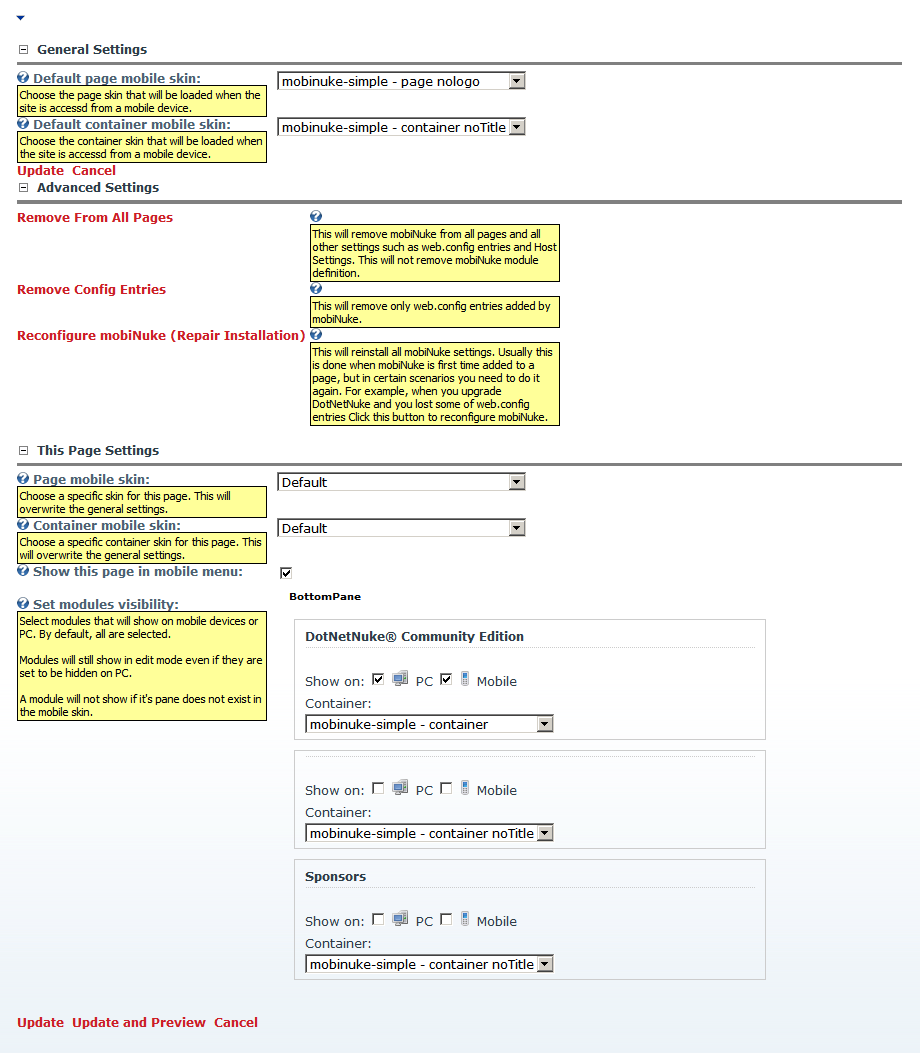
- Click on Mobile Settings to configure general settings and page specific settings for mobile access.
Technical Details
MobiNuke contains 5 components:
- A httpModule that redirects request coming from a mobile device to DefaultMobi.aspx
- A DotNetNuke Module with the following functions:
- When added for the first time it will auto-configure itself to be present on all pages;
- Manage the skin to be loaded when the page is accessed from a mobile device;
- Preview the page close to the way it looks on a mobile device;
- Enable or disable tab modules for mobile pages;
- A DefaultMobi.aspx page for mobile context that has the same function as Default.aspx. Anything that is not usable on mobile devices is cleaned out.
- A set of minimal skins suitable for mobile browsing. Currently the mobile skin contains only the ContentPane. It only shows the corresponding modules from the ContentPane of the desktop skin.
- A mobile friendly navigation provider.