
Desember 19, 2014 05:55 by
 Ben
BenI had been functioning with DNN for a long time, Believed this weblog could help other DNN develops. There are two approaches to Contain WSDL files into a DNN module. Service Reference and Web Reference.
Right here I will discussing about Web References.

So to Contain them into DNN initial Correct Click On References within your Project Solution
References -> Add Service Reference -> Advanced(Left bottom Corner) -> Add Web Reference.
Paste your WSDL link towards the URL
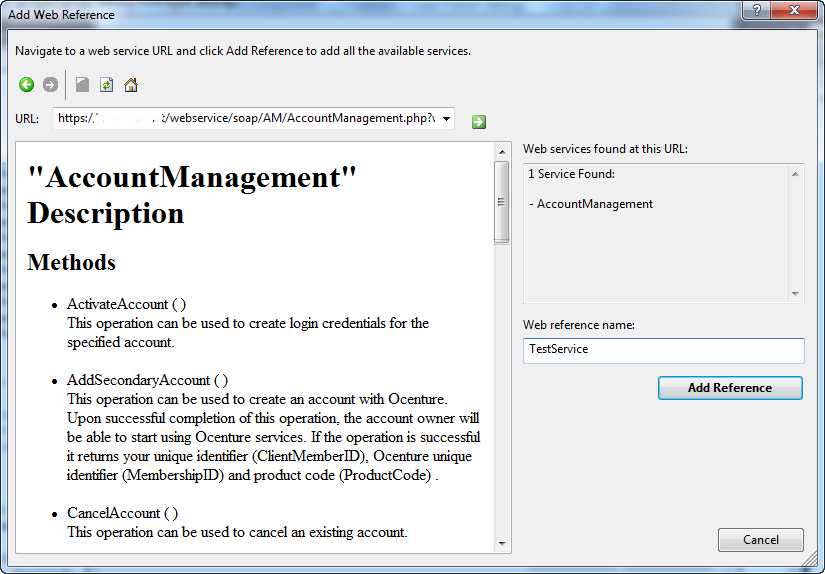
Once you hit Add Reference button, Visual Studio will update the Web.config at the Module level.
But need to delete the Module Level Config files.
But Dont forget to take a backup of it, If anything goes wrong
And Set few parameters at Site level web.config file
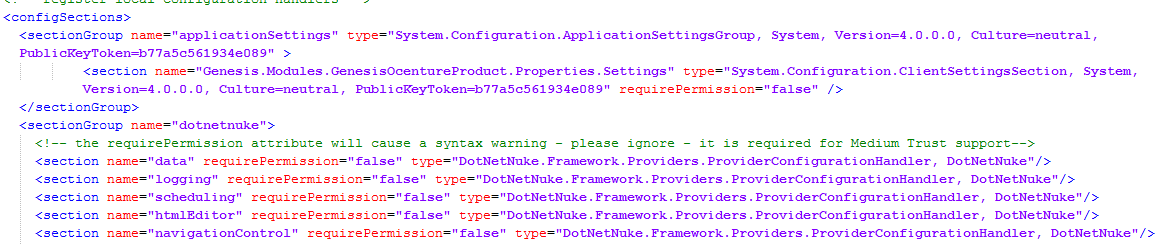
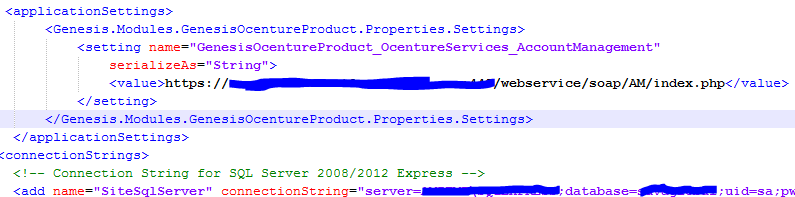
Remember If you Creating DNN module package and your module uses any kind of SOAP services.
You ought to add parameters to Target Site’s Config file otherwise the site may not work.
Happy Coding
Desember 18, 2014 05:46 by
BenDNN Security Out Of the Box
DNN (DotNetNuke) is currently the premier CMS of the US Government as a result of it's robust security and integration with current safety functions. Nevertheless even DNN is not totally excellent out of the box, and there are numerous additional safety attributes that can be put in location depending on your particular DNN eCommerce requirements. These security suggestions variety from easy to complex and cover many various aspects of possible security risks. No guide can accurately assess your particular safety requirements. In the event you would prefer to adequately secure your DNN web site, contact Clarity these days.

Improve Password Complexity and Use Specifications
Increasing password complexity is among the easiest and most successful methods to significantly boost security. Probably the most common and successful requirements are length and complexity. eight or much more characters along with a minimum of a single capital letter, one lowercase letter and 1 number is a good begin. You are able to contemplate requiring a non-alphanumeric character as well as putting restrictions on how lengthy a password may be used. Even with powerful password needs, you might be only preventing against brute force attacks.
Modify 'Host' and 'Admin' Passwords and Limit Their Use
Altering the Host and Admin password to incredibly complicated passwords is the single most successful step for safety, as each accounts are recognized to exist and are the most vulnerable to brute force attacks as a result of that. Make sure that any password you set for these accounts exceeds the password recommendations listed above. You should also think about limiting access to these accounts, as they may be essentially the most powerful accounts and would leave your site essentially the most vulnerable if they have been compromised.
Hash Password Storage
By default DotNetNuke utilizes encryption of user passwords. This provides a good degree of protection, and enables you to retrieve your password as encryption is a reversible operation. Nonetheless, should you usually do not want to help password retrieval, or want to make certain maximum protection, you may select to utilize Hashing as an alternative. Hashing is really a non-reversible operation, so even if your database is accessed or stolen, a hacker can't reverse engineer your password.