
November 3, 2015 21:20 by
 Dan
Dan
ASPHostPortal.com is considered one of the best among the many web hosts and is very well-known for reliable servers and most of all exceptional customer service. It relies on the customer satisfaction and hence we offer great prices as well as quality service and most of all the reliability that customers expect in a web hosting site. To keep updated our customer’s website, today we launch DotNetNuke 7.4.2 with cheap price, best support, and high speed connection.
DotNetNuke is the undisputed leader when it comes to Web Content Management for Microsoft ASP.NET. More than 700,000 production websites worldwide use this path breaking technology to manage their websites. DotNetNuke open source Content Management Platform functions as a web application development framework also. This application offers something for everyone so on the basis of your role in the organization you can utilize its powerful utilities to achieve your web initiatives.
DotNetNuke is a brilliant combination of Content management System (CMS) and Web application development framework. This adaptable architecture allows developers to effortlessly add functionality or make changes in the look of the website through the addition of DotNetNuke applications. There are lots of websites where you can find free applications, you can use or customize these applications according to your need. That is reason DotNetNuke has become the first choice of developers.
As one of the most popular and fastest growing hosts, ASPHostPortal.com has exceptional reliability. We have a world class data center that provides top of the industry uptime and multiple functional administrative tools. We offer a top notch and reliable customer service team. Given that Customer Service can be a key differentiator when comparing web hosts, our expert support team always carefully scrutinizes this element. To learn more about our DotNetNuke 7.4.2 Hosting, please visit http://asphostportal.com/Dotnetnuke-7-4-2-Hosting
About ASPHostPortal.com :
ASPHostPortal.com is The Best, Cheap and Recommended ASP.NET & Linux Hosting. ASPHostPortal.com has ability to support the latest Microsoft, ASP.NET, and Linux technology, such as: such as: WebMatrix, Web Deploy, Visual Studio 2015, .NET 5/ASP.NET 4.5.2, ASP.NET MVC 6.0/5.2, Silverlight 6 and Visual Studio Light Switch, Latest MySql version, Latest PHPMyAdmin, Support PHP 5. x, etc. Their service include shared hosting, reseller hosting, and Sharepoint hosting, with speciality in ASP.NET, SQL Server, and Linux solutions. Protection, trustworthiness, and performance are at the core of hosting operations to make certain every website and software hosted is so secured and performs at the best possible level.
Oktober 19, 2015 18:48 by
DanDNN cross portal sharing, which means that articles from a portal can be shared or displayed on other portals within the same DNN installation, without having to add the same articles again into your DNN. Articles can be edited only on the portal where they have been added into your DNN module, and they can be displayed on an unlimited number of portals. Article details are opened on the current portal, that is, they do not lead to the portal they have been taken from.
Sharing the articles via cross portal sharing can be set up exclusively by the SuperUser.
To enable sharing articles onto other portals, it is necessary to click on the "Cross portal sharing" icon in the Dashboard of your DNN.
On "Cross portal sharing" administrator's page, all the portals you have within the same DNN installation will be displayed.
To enable sharing content across portals, click on the radio button "Select portals", which will open the "Select portals" link. By clicking on it, a pop-up will open, allowing you to select which portal or portals you want to share articles with.
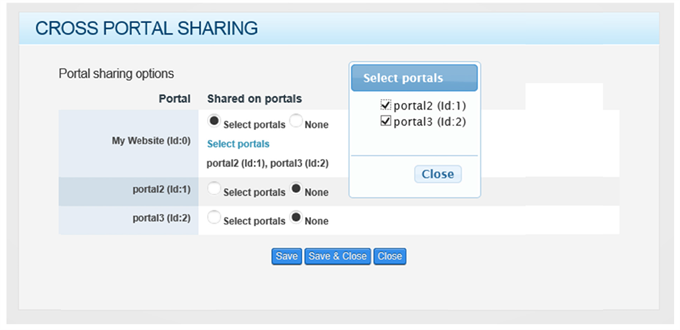
After setting up the sharing of content across portals, we click on the button "Save" or "Save & Close".
After successfully setting up the sharing of articles, the receiving portal will feature the option to select a portal where the articles will be displayed in this instance of the module. A portal can only be selected if we use custom settings (instance).
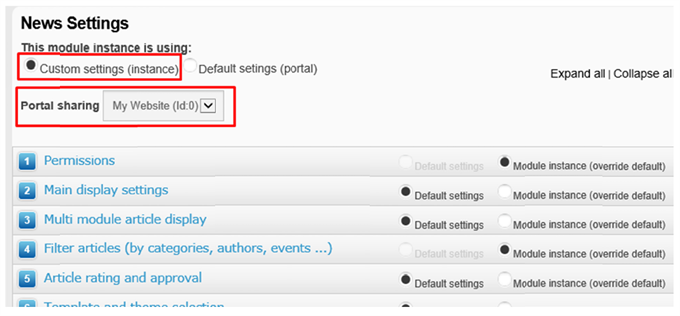
Receiving of data is allowed in all the satellite modules as well (EasyDNNnews Calendar, EasyDNNnews Tags, EasyDNNnews CategoriesMenu, EasyDNNnews Search).
Best DotNetNuke Hosting Recommendation
ASPHostPortal.com provides its customers with Plesk Panel, one of the most popular and stable control panels for Windows hosting, as free. You could also see the latest .NET framework, a crazy amount of functionality as well as Large disk space, bandwidth, MSSQL databases and more. All those give people the convenience to build up a powerful site in Windows server. ASPHostPortal.com offers DotNetNuke hosting starts from $5. We also guarantees 30 days money back and guarantee 99.9% uptime. If you need a reliable affordable DotNetNuke Hosting, we should be your best choice.
Oktober 15, 2015 09:51 by
KennyHow to Add JavaScript to DNN Page?
What is JavaScript?
JavaScript is a programming language used to make web pages interactive. It runs on your visitor's computer and doesn't require constant downloads from your website. JavaScript is often used to create polls and quizzes. JavaScript support is built right into all the major web browsers, including Internet Explorer, Firefox and Safari. Provided that the visitors to your site are using web browsers that support JavaScript (most do) and have JavaScript enabled (it is by default), then your JavaScript will run when they visit the page. JavaScript is an interpreted language, so no special program is required to create usable code. Any plain text editor such as Notepad (one of the Accessories that comes in Windows) is quite satisfactory for being able to write JavaScript. That said, an editor that colorizes the code to make it easier to see what is what makes it easier to find your mistakes.

Step by Step
- Navigate to a DNN page where you want to place slideshow
- Click on “Edit Page” located at right side of Admin bar and choose “Edit this page”, this will turn page to Edit mode.
- Say (you have already setup images) on top of content page, then click Modules menu in Admin bar, then click on “Add new Module”.
- Choose HTML Editor Module from the list of modules and drag it below to slide show (location of module not mandatory, but a best practice)
- Select settings from “gear” action menu of newly added module and remove value from “Module Title” and uncheck Is Sharable (this will prevent share this content across site) under Advanced Settings then click on “Update”
- Select Edit content from “pencil” action menu of new module, this will opens a word like editor.
- Choose “Basic Text Box” located in left top corner, this will show plane textbox, type relevant JavaScript code here.
- Finally choose “Raw” as Render mode located at bottom of the editor and Click on “Save”. This will attach our Script code with page.
Best DotNetNuke Hosting Recommendation
ASPHostPortal.com provides its customers with Plesk Panel, one of the most popular and stable control panels for Windows hosting, as free. You could also see the latest .NET framework, a crazy amount of functionality as well as Large disk space, bandwidth, MSSQL databases and more. All those give people the convenience to build up a powerful site in Windows server. ASPHostPortal.com offers DotNetNuke hosting starts from $5. We also guarantees 30 days money back and guarantee 99.9% uptime. If you need a reliable affordable DotNetNuke Hosting, we should be your best choice.
Oktober 8, 2015 12:19 by
Kenny
What is New in DotNetNuke 7.4.2?
The latest version of DotNetNuke is 7.4.2. This version has been released at October 6th 2015. This release is maintenance release, bug fixes and support for incremental updates.
SECURITY ISSUES
This release resolves the following two security issues:
- 2015-06 (Low) Potential XSS issue when using tabs dialog
- 2015-07 (Medium) Users are getting registered even though User Registration is set to None
What started out as a relatively small maintenance release has turned into one of their largest maintenance releases ever. They spent a lot of time working to resolve a number of password management and multi-language issues along with a few performance enhancements. In total, they ran well over 5000 manual and automated tests on this release with a 99% pass rate.
MAJOR HIGHLIGHTS
- Added upgrade support from beta release
- Fixed issue with lists in custom registration form
- Fixed issue with ignore words in Italian and French
- Fixed issue with site export in multi-language site
- Fixed issue where parameters in return URL were malformed
- Fixed issue in sitemap for multi-language site
- Fixed issue where control panel did not render links correctly in SSL offload environments
- Fixed issue where pages with future start date were inaccessible
- Fixed multiple password reset issues
- Fixed issue where site settings could be duplicated
- Fixed issue where dismissing all notifications removed messages as well
- Fixed issue where file link for missing file caused exception
- Fixed issue where localized portal settings were not getting applied when switching languages
- Fixed issue where admin was unable to change interface language
- Fixed issue where page name uniqueness was applied cross language
- Fixed multiple scheduler issues
Best DotNetNuke Hosting Recommendation
ASPHostPortal.com provides its customers with Plesk Panel, one of the most popular and stable control panels for Windows hosting, as free. You could also see the latest .NET framework, a crazy amount of functionality as well as Large disk space, bandwidth, MSSQL databases and more. All those give people the convenience to build up a powerful site in Windows server. ASPHostPortal.com offers DotNetNuke hosting starts from $5. We also guarantees 30 days money back and guarantee 99.9% uptime. If you need a reliable affordable DotNetNuke Hosting, we should be your best choice.