
Junie 28, 2013 08:50 by
 Ben
Ben
DotNetNuke is an open-source content management system ideal for creating and deploying projects such as commercial websites, corporate intranets and extranets, and online publishing portals. DotNetNuke is built on a Microsoft ASP.NET (VB.NET) platform, and is easily installed and hosted with all of our Windows Hosting Plans. Many things can be done by DNN, one of them to make a captcha code to protect from spam.

This is tips to guide you make a captcha code with DNN :
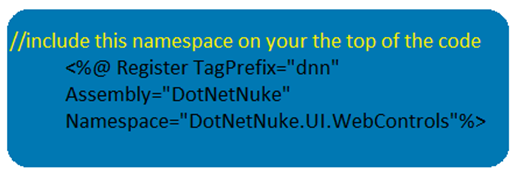
First important requirement is you have to add the DNN Framework control at the top code of your form.
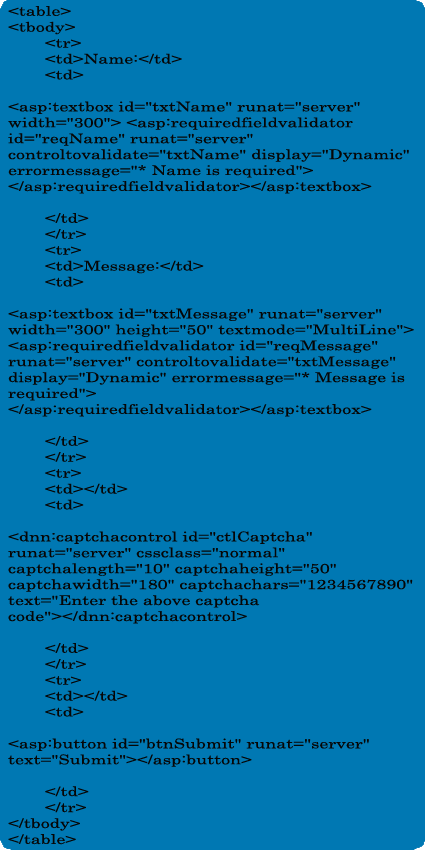
Write the code in the user control form :
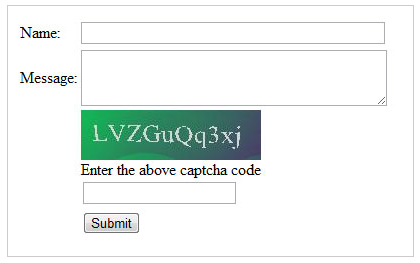
This is the quick screenshot on how the html code will looks like.
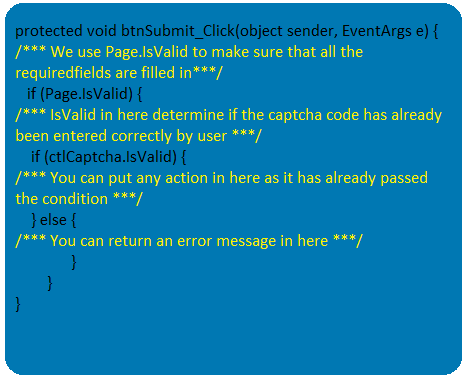
Now lets have a look at the back end code. If you see carefully, the ctlCaptcha.IsValid determines if a captcha code has been entered correctly by user or not.
The list of captcha code properties that you need to know:
- CaptchaWidth: The width of the captcha control.
- CaptchaHeight: The height of the captcha control.
- CaptchaLength: The length of the characters inside the captcha control.
- CaptchaChars: The characters that will be used in the captcha control, dont use this attribute if you want to use random characters.
- Text: This will be the Text Introduction to notify the user to enter the captcha code.
- Text: This will be the Text Introduction to notify the user to enter the captcha code.
- ErrorMessage: This will be the error message when a captcha code is entered wrong. Note: you can overwrite the error message in behind code as well.