
Desember 16, 2014 11:10 by
 Dan
Dan
ASPHostPortal.com, The Best, Cheap and Recommended ASP.NET Hosting proudly Launch nopCommerce 3.50 Hosting at affordable price, instant activation, and fast & stable network. ASPHostPortal.com provides full trust web hosting services for your nopCommerce 3.50 site. Full service and fully accountable, we expertly manage your hosting.
nopCommerce is an open source ecommerce software that contains both a catalog frontend and an administration tool backend. nopCommerce is a fully customizable shopping cart. It's stable and highly usable. From downloads to documentation, nopCommerce.com offers a comprehensive base of information, resources, and support to the nopCommerce community. Now, nopCommerce has released the new version (nopCommerce 3.50).
nopCommerce 3.50 is much faster and easier to use, there is a slew of design as well as performance changes. nopCommerce 3.50 now support rental products, new tax rules for Europe Union from 2015, better warehouse and inventory control. In this version, nopCommerce allow a store owner to define custom address attributes and see all existing extensions and themes in admin area. And now specification attributes support several types like option, custom text, HTML text and hyperlink.
Why to Host Your nopCommerce 3.50 Site with ASPHostPortal.com
Uptime & Support Guarantees
We are so confident in Windows hosting services, we will not only provide you with a 30 days money back guarantee, but also give you a 99.9% uptime guarantee.
Dedicated Application Pool
With us, your site will be hosted using isolated application pool in order to meet maximum security standard and reliability.
Security
We employ best in breed firewalls and perimeter network protection.
ASPHostPortal.com is The Best, Cheap and Recommended ASP.NET Hosting. With the nopCommerce 3.50 in their hosting deal will make ASPHostPortal continue to be the Best ASP.NET hosting providers. To learn more about nopCommerce 3.50 Hosting, please visit http://asphostportal.com/ nopCommerce-3-50-Hosting
About ASPHostPortal.com :
ASPHostPortal.com is The Best, Cheap and Recommended ASP.NET Hosting. ASPHostPortal.com has ability to support the latest Microsoft and ASP.NET technology, such as: such as: WebMatrix, WebDeploy, Visual Studio 2015, .NET 5/ASP.NET 4.5.2, ASP.NET MVC 6.0/5.2, Silverlight 6 and Visual Studio Lightswitch. ASPHostPortal include shared hosting, reseller hosting, and sharepoint hosting, with speciality in ASP.NET, SQL Server, and architecting highly scalable solutions. ASPHostPortal.com strives to supply probably the most technologically advanced hosting solutions available to all consumers the world over. Protection, trustworthiness, and performance are on the core of hosting operations to make certain each and every website and/or software hosted is so secured and performs at the best possible level.
Desember 10, 2014 05:36 by
Dan
ASPHostPortal.com, The Best, Cheap and Recommended ASP.NET Hosting proudly announced the availability of ASP.NET 5 Hosting in their hosting deals. ASPHostPortal offer ASP.NET 5 Hosting at affordable price, easy and instant setup, and best customer support.
Finally, the long awaited release of ASP.NET 5, ASPHostPortal are happy to announce the availability of the .NET Framework 5 for all our hosting packages. It is a highly compatible, in-place update to the .NET Framework 4, 4.5 and 4.5.2. ASP.NET 5 has been re-imagined from the ground up to provide a faster development experience, best in class performance, full side-by-side support.
ASP.NET 5 is clean and free of bugs and is a composable .NET stack for building modern web applications for both cloud and on-premises servers. ASP.NET 5, with the help of Visual Studio 2015, lets you create modern web applications. Modern web applications not only target all devices, including PCs, Macs, Tablets and smartphones, but also work with any browser or operating system.
ASP.NET 5 gives you greater flexibility by being able to run on three runtimes:
Full .NET CLR
The full .NET CLR is the default runtime for projects in Visual Studio. It provides the entire API set and is your best option for backwards compatibility.
Core CLR (cloud-optimized runtime)
The Core CLR is a lean and completely modular runtime for ASP.NET 5 projects. This CLR has been re-designed into components so you have the flexibility to include only those features that you need in your app. You add the components as NuGet packages. When you are finished, your app is dependent only on required features. By re-factoring the runtime into separate components, we can deliver improvements to the components more quickly because each component is updated on its own schedule. The Core CLR is about 11 megabytes instead of around 200 megabytes for the full .NET CLR. The Core CLR can be deployed with your app and different versions of the Core CLR can run side-by-side (both of these advantages are described in greater detail below).
Cross-Platform CLR
Microsoft will release a cross-platform runtime for Linux and Mac OS X. When released, this runtime will enable you to develop and run .NET apps on Mac and Linux devices. They will work closely with the Mono community on this effort. Until its release, you can use the Mono CLR for cross-platform development.
ASPHostPortal.com is The Best, Cheap and Recommended ASP.NET Hosting. With the ASP.NET 5 in their hosting deal will make ASPHostPortal continue to be the Best ASP.NET hosting providers. To learn more about ASP.NET 5 Hosting, please visit http://asphostportal.com/ASPNET-5-Hosting.
About ASPHostPortal.com :
ASPHostPortal.com is The Best, Cheap and Recommended ASP.NET Hosting. ASPHostPortal.com has ability to support the latest Microsoft and ASP.NET technology, such as: WebMatrix, WebDeploy, Visual Studio 2012, .NET 4.5.2/ASP.NET 4.5.1, ASP.NET MVC 6.0/5.2, Silverlight 5 and Visual Studio Lightswitch. ASPHostPortal include shared hosting, reseller hosting, and sharepoint hosting, with speciality in ASP.NET, SQL Server, and architecting highly scalable solutions. ASPHostPortal.com strive to supply probably the most technologically advanced hosting solutions available to all consumers the world over. Protection, trustworthiness, and performance are on the core of hosting operations to make certain each and every website and/or software hosted is very secured and performs at the best possible level.
Desember 9, 2014 07:44 by
BenHow to set Cache in DNN application/ site

Today I will show you how to set cache in DNN application/site. It is very important to set cache timing for your applications. In DNN application/ site you can set cache in host setting page. To do that you need to login with the application/ site with host login and go to “Host Settings” page. Hit the “Advance Settings” tree and then click on “Performance Settings” link. Then you can find a dropdown where all the cache types are listed, name as below,
- No Caching: 0
- Light Caching: 1
- Moderate Caching: 3
- Heavy Caching: 6
I will mention later on about the number associated with the cache name, its importance and where you need to choose a cache type, later in this tip.
This is the screenshot of the “Performance Settings” panel.
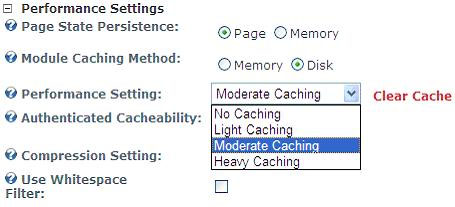
Below is the code I have picked from hostsetting.aspx file (admin\host\hostsettings.ascx).. To set the cache time of your site you need to set the value with the cache name which will render in the host settings page under performance settings panel.
<asp:dropdownlist runat="server" Width="150">
<asp:listitem resourcekey="NoCaching" value="0">No Caching</asp:listitem>
<asp:listitem resourcekey="LightCaching" value="1">Light Caching</asp:listitem>
<asp:listitem resourcekey="ModerateCaching" value="3">Moderate aching</asp:listitem>
<asp:listitem resourcekey="HeavyCaching" value="6">Heavy Caching</asp:listitem>
</asp:dropdownlist>
The value in dropdown ranges from 0 to 6. The code above takes the value set in the dropdown and multiplies it by 20 to determine the cache duration
Desember 8, 2014 07:43 by
DanToday, we will explain about Navigating to Another Page from DotNetNuke Custom Module. In a few circumstances, there is a prerequisite to add usefulness that permits clients to explore from one page then onto the next in Dotnetnuke Custom Module. For instance, in the event that you have a custom module called "Register" and the client has successfully registered, you may need to explore the client to an alternate page to view client login detail where an alternate custom module as of now been included request to view login client detail.

In Dotnetnuke module we require the Tab Id of the page so as to explore to an alternate page.So to attain this we can include a dropdown field in Edit page of our custom module(register) to demonstrate all the accessible Tab/ Page names of DNN site where client can choose the Page name to redirect which inside keeps the Tab Id as quality. Then, we can utilize that Tab Id value as a part of request to explore to other page.
[Code in C#]
EditRegister.ascx
//Adding a Dropdown field in EditRegister.ascx page to allow admin or host to select the redirect page name
<asp:DropDownList ID="ddlTabNames" runat="server"></asp:DropDownList>
EditRegister.ascx.cs
//Adding available page names to the dropdown using object of TabController
if (Page.IsPostBack == false)
{
DotNetNuke.Entities.Tabs.TabController objTabController = new DotNetNuke.Entities.Tabs.TabController();
ArrayList arrlTabs = null;
arrlTabs = objTabController.GetTabs(this.PortalId);
string strKey = string.Empty;
string strValue = string.Empty;
ddlTabNames.Items.Clear();
//Get the tabname and tabid of each tabs or page using object of TabInfo and added to dropdownlist field
foreach (Entities.Tabs.TabInfo objTab in arrlTabs)
{
strKey = objTab.TabName;
strValue = objTab.TabID.ToString();
ddlTabNames.Items.Add(new ListItem(strKey, strValue));
}
}
//Using ModuleControler object we need to save selected Page TabId in module specific variable
ModuleController objController = new ModuleController();
objController.UpdateModuleSetting(this.ModuleId, "TabID", ddlTabNames.SelectedValue);
ViewRegister.ascx.cs
Now From custom module view page we can redirect to another Page or Tab of DNN website using following code
//Get the selected TabId
int iProfileTabId = Convert.ToInt32(Settings["TabID"]);
//Redirect to selected Page
this.Response.Redirect(Globals.NavigateURL(iProfileTabId), true);
Desember 5, 2014 08:33 by
BenHow To Fixing PortalSettings issue on multilingual Websites in DNN 7.3.2
Today I will share about How to fixing issue on multilingual website in DNN 7.3.2.
DNN 7.3.2 enhanced the stored procedure for saving Site Settings to add multilanguage support, unfortunately it missed to include proper handling of language specific settings within the business layer and some other aspects. As effect, DNN 7.3.2 fails to load site settings for multilingual sites and renders an error message.
I created a full solution to add localization support for website settings, which is scheduled to be included with DNN 7.4.0, meanwhile you may run the script below from Host > SQL, in order to fix this issue.
"NOTE: DO NOT APPLY TO DNN 7.4.0 OR LATER"
This fix is also included in TurboDNN 0.9.3 ff. - the solution to improve database performance of DNN, which might be downloaded for free from here. (Please take the time to read instructions enclosed.)
-- ensure, last modified is not Null (should not exist)
UPDATE {databaseOwner}[{objectQualifier}PortalSettings]
SET LastModifiedOnDate = '2000-01-01'
WHERE LastModifiedOnDate is Null
GO
IF OBJECT_ID(N'{databaseOwner}[{objectQualifier}GetPortalSetting]', N'P') IS NOT NULL
DROP PROCEDURE {databaseOwner}[{objectQualifier}GetPortalSetting]
GO
CREATE PROCEDURE {databaseOwner}[{objectQualifier}GetPortalSetting]
@PortalID Int, -- Not Null
@SettingName nVarChar(50), -- Not Null
@CultureCode nVarChar(50) -- not Null
AS
BEGIN
SELECT TOP (1)
SettingName,
CASE WHEN Lower(SettingValue) Like 'fileid=%'
THEN {databaseOwner}[{objectQualifier}FilePath](SettingValue)
ELSE SettingValue
END AS SettingValue,
CreatedByUserID,
CreatedOnDate,
LastModifiedByUserID,
LastModifiedOnDate,
CultureCode
FROM {databaseOwner}[{objectQualifier}PortalSettings]
WHERE PortalID = @PortalID
AND SettingName = @SettingName
ORDER BY LastModifiedOnDate DESC
END
GO
IF OBJECT_ID(N'{databaseOwner}[{objectQualifier}GetPortalSettings]', N'P') IS NOT NULL
DROP PROCEDURE {databaseOwner}[{objectQualifier}GetPortalSettings]
GO
CREATE PROCEDURE {databaseOwner}[{objectQualifier}GetPortalSettings]
@PortalId Int, -- not Null!
@CultureCode nVarChar(20) -- not Null!
AS
BEGIN
SELECT
SettingName,
CASE WHEN Lower(SettingValue) Like 'fileid=%'
THEN {databaseOwner}[{objectQualifier}FilePath](SettingValue)
ELSE SettingValue
END AS SettingValue,
CreatedByUserID,
CreatedOnDate,
LastModifiedByUserID,
LastModifiedOnDate,
CultureCode
FROM {databaseOwner}[{objectQualifier}PortalSettings] P
JOIN (SELECT PortalID, SettingName SN, Max(LastModifiedOnDate) MD
FROM {databaseOwner}[{objectQualifier}PortalSettings]
WHERE PortalID = @PortalId
GROUP BY PortalID, SettingName) S
ON P.PortalID = S.PortalID AND P.SettingName = S.SN AND P.LastModifiedOnDate = S.MD;
END
GO
UPDATE: this fix has been included with DNN 7.3.4, you shouldn't need it, if you upgraded to 7.3.4 and don't apply it to DNN 7.4.0 or later.
Desember 3, 2014 05:31 by
MarkFixing duplicate Display Names in DotNetNuke
Since DotNetNuke 6, it is possible to require unique display names. This allows social modules to display a name for a user without exposing the login UserName or the real person first and last names. If you site uses social features, it is important that those display names be unique to prevent a user to post content in the name of another user.
By activating this feature, users are no longer able to register with a Display Name already in use. However, there are 2 oversights. First, the user or an admin can change the Display Name after registration to anything else (including a Display Name already in use). Secondly, you may already have duplicates before you activate this feature, and they don't get automatically changed. In this blog post, I provide you with both solutions the these problems.
Prerequisites
BACKUP YOUR WEBSITE FILES AND DATABASE
This procedure has only been tested on DotNetNuke 7.3.3, so I recommend you first upgrade to this version. If you feel like trying it out on other versions, feel free to do it and post your results in the comments, but make sure you do that backup first.
1. Activating the feature
- First, we will activate the feature requiring unique display names.
- Connect to your website as an administrator
- Navigate to Admin -> Site Settings
- Click the User Account Settings tab
- In the Registration Settings section, tick Require Unique Display Name
- Click the Update button at the bottom
- Now, it will be impossible for user to register using a Display Name already used by another user.
2. Correcting the problem
- I created a patch or DotNetNuke 7.3.3 that will prevent users and admins to change the Display Name to something already in use. Like I said before, this is for DotNetNuke 7.3.3, feel free to test and comment on other versions, but make sure you have backup. I submitted a the bog repport DNN-5874 and patch (pull request 160 now pull request 177) to DotNetNuke and I hope it will be applied to DotNetNuke 7.3.4Upgrade DotNetNuke to version 7.3.3 (or try with another version and report in the comments)
- Download the file PatchDNN-5874.zip
- Extract that file to your root DotNetNuke folder overwriting the files
- (optional, if you site has other languages):
Go to Admin -> Languages
Translate those keys:
File Key
DesktopModules/Admin/Security/App_LocalResources/EditUser.ascx.resx DisplayNameNotUnique.Text
DesktopModules/Admin/Security/App_LocalResources/User.ascx.resx DisplayNameNotUnique.Text
We have now resolved this issue allowing users to change their display name to another one in use.
3. Fixing existing duplicates
- Now that the issue is resolved for the future, we need to resolve it for the past. Your site may already have duplicate display names before this patch. In order to solve that, I have created a small module that will display all duplicates and allow you to change them in batch by clicking a single button, it will append the UserID to the display name to all users except the first that registered with that display name.
- Download the file DuplicateDisplayNamesFix_00.00.01_Install.zip
- The source package is also available if you are a developer DuplicateDisplayNamesFix_00.00.01_Source.zip
- Install it like any other module (Host -> Extensions -> Install Extension Wizard
- Create a temporary page that is only visible by administrators (or use an existing admin page)
- Place the Duplicte Display Names Fix module on that page
- The module will display a list of all users with duplicate display names or a message if none are present
- You can export the list to Excel or CSV if you want to keep that information for your records (to send them an email for example)
- Now you can click the GO button to rename them. (this operation cannot be undone, make sure you have that backup.)
If you don't think to use the module again you can now uninstall it and delete the temporary page.
Desember 2, 2014 07:12 by
Mark
DNN 7.3 has been released and contains lots of changes for performance and stability, bug fixes and some new features.
I was first alerted to an issue with Url Master and DNN 7.3, who found that the API cleanup in 7.3 had removed an old DNN API that Url Master was leveraging, which meant that the site would stop working after the 7.3 Upgrade. The error you get if you upgrade DNN without first upgrading Url Master to 2.8.2 is this:
500 Internal Server Error
The requested Url does not return any valid content.
Administrators
Change this message by configuring a specific 404 Error Page or Url for this website.
This is the default URL Master error output (unless you have debug mode enabled) which intentionally hides the actual exception for security reasons. If you open the event log, you’ll find something like this:
Exception: Method not found: 'DotNetNuke.Entities.Portals.PortalAliasCollection DotNetNuke.Entities.Portals.PortalAliasController.GetPortalAliases()
The solution is that you need the latest version of the Url Master module, version 2.8.2, which uses a newer method to get the portal alias data.
Get the Url Master Module 2.8.2 Download
If you haven't upgraded to DNN 7.3 already, you must upgrade to 2.8.2 before upgrading.
Just download the 2.8.2 install package, and upgrade via the Host->Extensions page. You do not need to update your licence – this version is available to *all* existing Url Master customers.
If you have already upgraded and have found that your site is dead with this error, then you will need to manually patch the files. Here are the steps:
- Download the Url Master install package
- Extract the zip file locally on your computer to a folder, so you can see the files inside the zip
- Within the extracted zip file, you will see 4 files.
- Copy these 4 files into the \bin directory of your site that needs to be upgraded. Use FTP or copy/paste or any other method to get it into the \bin directory.
- Once they are copied into the bin directory, try the site again. It should start and run normally.
- Once your site is running again, install the (compressed) file as normal through the Host->Extensions page. This won't change the versions installed, but it will bring your extensions catalog up to date.
I appreciate if people spread these instructions to those who are running Url Master and are intending to upgrade to 7.3 as a preventative measure.
Desember 1, 2014 05:52 by
Dan
Today, we will discuss about Create a DotNetNuke (DNN) module with an .ascx control. Without the utilization of the visual studio templated of the Dotnetnuke starterkit.
Installed on the PC :
- Visual Studio 2008 Express
- IIS 5.1
- Dotnetnuke
- SQL Server 2008 R2
Dotnetnuke is arranged and acting as the default site as http:\\localhost. I utilize XP Pro IIS administrator to switch between sites.
Create a visual studio project
- Create an C# ASP.NET Web application project
The location of the project can be inside the DotNetNuke folder in the \DesktopModules folder. I have used “TestProject”.
- The output of the project can be directed into the bin folder of the DotNetNuke folder. You can enter ‘..\..\bin’ as the output path in the build tab of the project properties
- Add a reference to the DotNetNuke.dll (located in the \bin folder)
- Add a new Web User Control (.ascx) file to your project (e.g. WebUserControlTest.ascx)
- In the code behind of the new control, use the DotNetNuke namespaceusing DotNetNuke.Entities.Modules;
- Inherit your control from DotNetNuke’s PortalModuleBase class. In the class created by visual studio you can replace ‘System.Web.UI.UserControl’ by ‘PortalModuleBase’. It will look like this:public partial class WebUserControlTest: PortalModuleBase
- Implement some sample code inside the control.
For example, add a literal component to the control, and set the Text in the ‘Page_Load’ function of the code behind.
The .ascx file looks like this:
<%@ Control Language="C#" AutoEventWireup="true" CodeBehind="WebUserControlTest.ascx.cs" Inherits="SecondTest.WebUserControlTest" %>
<asp:Literal ID="PageHeaderText" runat="server" />The .ascx.cs file looks like this:using System;
using System.Collections.Generic;
using System.Linq;using System.Web;
using System.Web.UI;
using System.Web.UI.WebControls;
using DotNetNuke.Entities.Modules;
namespace TestProject
{
public partial class WebUserControlTest : PortalModuleBase
{
protected void Page_Load(object sender, EventArgs e)
{
if (this.Page.IsPostBack == false)
{
this.PageHeaderText.Text = "Hallo DotNetNuke world!!!";
}
}
}
}
- Build the user control project. A DLL called ‘TestProject.dll’ will be created in the \bin folder
Notes: The web control can't contain a Form. Since Dotnetnuke as of now has structure on its parent .aspx page. Asp.net can just have one structure for every page. In this way, how about we utilize Panels, Views or Multiviews in your web control.
Create a module definition in DotNetNuke
- Login in with a SuperUser account (host)
- On the host page, go to module definitions
- If you are in Edit mode, you’ll find an option ‘create new module’ at the bottom of the page.
- For ‘Create module from”, select ‘control’ (I guess….)
- Then in the module folder, select the folder you made for your project. I looks like DNN scans for folder in the DesktopModules folder. In this example it is ‘TestProject’.
- When the module folder is chosen, the resource if filled in by DNN: WebUserControlTest.ascx
- Enter a module name: E.g. ‘TestModule’
- Enable the creating of a test page if you want.
- Click on ‘create module’ and DNN updates it’s administraion and create a page with our new module already inside it. You need to see the text “Hallo DotNetNuke world!!!” on the page.
If there should arise an occurrence of issues. Check the security settings inside IIS. Permit script to run in the home direcorty. Furthermore let the new organizer of the venture be adjusted by the Asp.net machine account and the web visitor account (in the event that you need to test if from an alternate machine in your LAN).
Debug your control
- In the Web settings of the project, set http://localhost/ as the Start Url.
- Enable the use of the local IIS server and configure the following:
- project url: http://localhost/DesktopModules/TestProject
- Override appliucation root URL: http://localhost/
- Go to the C# code behind of the control and set a break point at the line where we set the Text of the literal.
- Start debugging (press F5)
- A browser will be started, and the DotNetNuke start page is loaded.
- Navigate to the test page of the ‘TestProject’ module. Maybe you have to login for this.
- At the moment, the test page is loaded, visual studio express will become active and display the location where it has stopped. Now you can step through the code of your control.
You' can get an error message that your framework can't begin debugging on the web server. It likewise says you have to empower incorporated Windows verification for that. I replicated the data how to do that:
To enable integrated Windows authentication
- Click Start and then click Control Panel.
- In Control Panel, double-click Administrative Tools.
- Double-click Internet Information Services.
- Click the DotNetNuke Web server node.A Web Sites folder opens underneath the server name.
- You can configure authentication for all Web sites or for individual Web sites. To configure authentication for all Web sites, right-click the Web Sites folder and then click Properties. To configure authentication for an individual Web site, open the Web Sites folder, right-click the individual Web site, and then click Properties.The Properties dialog box is displayed.
- Click the Directory Security tab.
- In the Anonymous access and authentication control section, click Edit.The Authentication Methods dialog box is displayed.
- Under Authenticated access, select Integrated Windows authentication.
- Click OK to close the Authentication Methods dialog box.
- Click OK to close the Properties dialog box.
- Close the Internet Information Services window.
November 30, 2014 20:22 by
MarkGetTab Method without DNN Context

As you know, the simple method GetTab(int tabid) was obsolete and has been replaced by GetTab (ByVal TabId As Integer, ByVal PortalId As Integer, ByVal ignoreCache As Boolean). If you want to call the new method, we have to pass the additional parameter “PortalId”.
In common, the object PortalSettings can be easy to get with DNN context, such as special dnn module & page; however, it may be inaccessible in some sceneries, such as separate aspx page or handler. Then is there any way to get the correct tab info with this new method? Now there is a simple trick to do it with passing into Null.NullInteger as the parameter PortalId. So the coding looks like that:
var tabController = new TabController();
var blogPage = tabController.GetTab(tabID, Null.NullInteger, false);
Deeping into the source code, you will find out that it always tries to get the correct PortalId for this tab/page object:
//if we do not know the PortalId then try to find it in the Portals Dictionary using the TabId
portalId = GetPortalId(tabId, portalId);
//if we have the PortalId then try to get the TabInfo object
tab = GetTabsByPortal(portalId).WithTabId(tabId) ??
GetTabsByPortal(GetPortalId(tabId, Null.NullInteger)).WithTabId(tabId);
Hope this trick & tip helps if someone has the same issue.
November 28, 2014 05:14 by
Mark
Registered Script Control Error in DotNetNuke 7
If you’ve made the transition from DotNetNuke 6 to DotNetNuke 7 you’ve probably discovered that the AJAX Toolkit controls don’t play nice with DotNetNuke any more. Fortunately the Telerik AJAX controls have been bundled with DotNetNuke for version 7. I’ve discovered that converting to the Telerik controls has been beneficial and worth the upgrade.
Still, it can be a pain getting the code right. One particular error that I ran into today was the Registered Script Control error. It looks something like this:
"Script control ‘{controlname}’ is not a registered script control. Script controls must be registered using RegisterScriptControl() before calling RegisterScriptDescriptors(). Parameter name: scriptControl"
The error results from “stacked” AJAX controls. Consider the following HTML
<%@ Register TagPrefix=”dnnui” Namespace=”DotNetNuke.Web.UI.WebControls” Assembly=”DotNetNuke.Web” %>
<%@ Register TagPrefix=”DNN” Namespace=”DotNetNuke.UI.WebControls” Assembly=”DotNetNuke.WebControls” %>
<DNN:DNNTabStrip ID=”tabsProject” runat=”server” TabRenderMode=”All” Visible=”true”>
<DNN:DNNTab runat=”server” Label-Text=”Properties” ID=”tabGeneral”>
<dnnui:DnnAjaxPanel runat=”server” ID=”dapMain”>
<asp:Label runat=”server” ID=”lblInfo”></asp:Label>
</dnnui:DnnAjaxPanel>
</DNN:DNNTab>
<DNN:DNNTab runat=”server” Label-Text=”Properties” ID=”tabSecond”>
<dnnui:DnnAjaxPanel runat=”server” ID=”dapSecond”>
<asp:Label runat=”server” ID=”lblMessage”></asp:Label>
</dnnui:DnnAjaxPanel>
</DNN:DNNTab>
</DNN:DNNTabStrip>
Let’s say that the second tab (tabSecond) should only appear under certain conditions; a record was created, a particular user is logged, whatever the condition is doesn’t matter, just that the tab should appear at certain times and not appear at other times.
In the code behind the condition block might look like this:
if (condition) then
tabSecond.Visible = False
end if
But this results in the Registered Script Control error. Modify the condition block this way:
if (condition) then
dapSecond.EnableAJAX = False
tabSecond.Visible = False
end if
This should resolve the error
What was the issue? I’m glad you asked.
The issue causing the error is that AJAX controls are registered with the AJAX script manager and cannot be unregistered, or moved. Hiding an AJAX control is equivalent to moving it from the script. In order to circumvent that we’re disabling AJAX on the control before it has a chance to be rendered and registered with the script manager.